


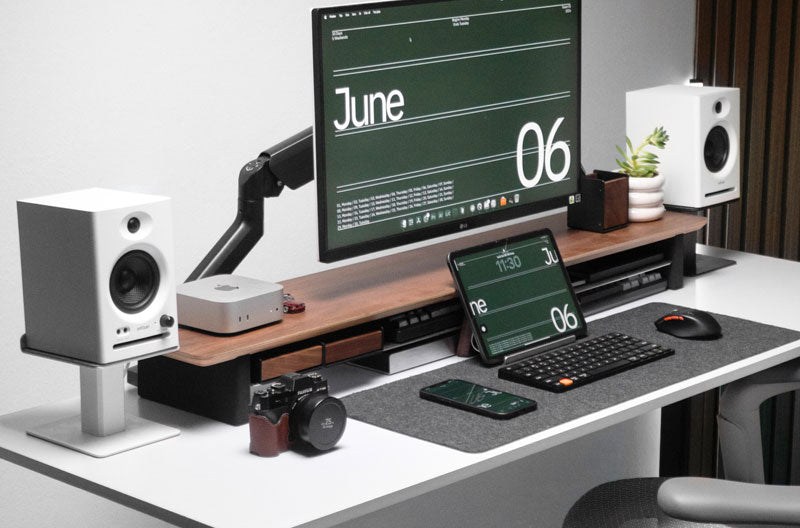
A desk shelf 24 inches wide measures exactly 60.96 cm across its horizontal surface. Finding suitable monitor support requires checking available desk space, monitor base dimensions, and storage needs. Spacet offers compact monitor stands and larger desk shelf systems, helping users compare practical solutions for workstations where every centimeter of space matters.
What Does a Desk Shelf 24 Inches Wide Actually Measure?
A 24-inch-wide desk shelf measures exactly 60.96 cm horizontally. The measurement describes the platform's width rather than its depth, height, or supported monitor size. Buyers should confirm the product's overall dimensions and usable supporting area before deciding whether the shelf fits their workstation.

How Many Centimeters Is a 24-Inch Desk Shelf?
One inch equals exactly 2.54 cm, making 24 inches equivalent to 60.96 cm.
For comparison, a 51 cm monitor stand measures approximately 20.1 inches, while an 80 cm desk shelf measures approximately 31.5 inches.
These differences are important when choosing compact desk accessories for limited workspaces.
Is a 24-Inch Shelf the Same as a Shelf for a 24-Inch Monitor?
No. Shelf width measures the platform horizontally, while monitor size refers to the screen's diagonal.
A 24-inch monitor may have a supporting base considerably narrower than its display.
Compatibility depends on the monitor base footprint, equipment weight, and available supporting surface rather than screen size alone.
How Is a Compact Desk Shelf Different From a Monitor Riser?
A compact monitor riser primarily elevates one display while creating space underneath.
A desk shelf may provide a broader supporting platform with integrated organization features.
A long desk shelf is more appropriate when additional devices require horizontal space, but smaller workstations may benefit from simpler monitor support.
Will a 24-Inch Desk Shelf Fit Your Desktop?
A 24-inch-wide shelf can fit a desk with at least 60.96 cm of usable horizontal space, provided its supporting structure rests securely on the surface. Desk depth and nearby accessories also affect compatibility. Measuring the available desktop area helps prevent overhang and overcrowding.
How Do You Measure a Small Desk Correctly?
Measure the desktop's usable width and depth, excluding areas blocked by permanent fixtures.
Identify where the monitor support will sit and reserve enough room for essential accessories.
Compare the available measurements with the product's complete footprint rather than relying exclusively on the desk's advertised dimensions.
Can a 20-Inch Monitor Stand Fit a 24-Inch Desk?
Spacet's Monitor Stand v2.0 measures 51 cm wide, approximately 20.1 inches.
A 60.96 cm-wide desktop provides 9.96 cm of additional horizontal space. When centered, the stand leaves approximately 4.98 cm on each side.
The arrangement still requires sufficient desk depth and secure support.
How Much Space Should Remain for Your Keyboard?
Keyboard clearance depends on desk depth, keyboard dimensions, and the monitor's position.
Measure the area needed for comfortable typing and mouse movement before selecting a stand.
A compact platform should preserve usable working space rather than pushing the keyboard uncomfortably close to the desk edge.
Can a 24-Inch-Wide Desk Shelf Support Your Monitor?
A 24-inch-wide shelf can support a monitor when the original base fits securely and the equipment weight stays within the manufacturer's rated capacity. The display's diagonal measurement cannot establish compatibility. Shelf depth and the additional screen elevation also require consideration.

Can a 24-Inch Monitor Fit on a 24-Inch Shelf?
A 24-inch monitor can fit when its supporting base is smaller than the shelf's usable surface.
Measure the widest and deepest points of the original monitor base.
Confirm that the stand supports the equipment weight and does not leave supporting feet extending beyond the platform.
Can a 27-Inch Monitor Use a Smaller Stand?
A 27-inch monitor does not necessarily require a 27-inch-wide platform.
Many displays have supporting bases narrower than their screens, although dimensions vary between models.
Spacet's compact monitor stand may be suitable when the base fits completely and the equipment meets the product's load requirements.
Does Monitor Stand Height Affect Comfort?
Monitor stand height changes the display's position relative to seated eye level.
Spacet's Monitor Stand v2.0 raises the supporting surface by approximately 9 cm.
Before choosing a fixed-height platform, check whether additional elevation places the screen at a comfortable viewing level.
Which Spacet Monitor Support Works for a 24-Inch Workspace?
Among the Spacet products considered, Monitor Stand v2.0 offers the most compact width at 51 cm. Desk Shelf Pro v2.0 Medium measures 80 cm, while AIRY Modular Medium measures 84 cm. Neither medium shelf fits entirely within a desktop measuring exactly 60.96 cm wide.
Why Consider Monitor Stand v2.0 for a Small Desk?
The Spacet Monitor Stand v2.0 measures 51 × 23.5 × 9 cm.
The compact design provides a dedicated supporting platform for a single monitor while creating space beneath the display.
Explore Monitor Stand v2.0 to review its dimensions, materials, and available configurations.
When Is Desk Shelf Pro v2.0 Medium a Better Choice?
The Desk Shelf Pro v2.0 Medium measures approximately 80 cm wide and includes integrated lower storage.
The larger platform suits workstations with sufficient horizontal space for additional organization.
Explore the Premium Collection 2.0 when a smaller monitor riser cannot accommodate the intended equipment arrangement.
Is AIRY Modular Medium Suitable for Compact Workspaces?
The AIRY Modular Medium measures approximately 84 cm wide and features an underside mounting grid.
Compatible accessories allow users to organize selected equipment beneath the platform.
The modular configuration requires a desktop wide enough to support its complete footprint.
How Do Spacet's Compact Options Compare?
|
Spacet product |
Width |
Main application |
|
Monitor Stand v2.0 |
20.1″ |
Compact single-monitor setup |
|
Desk Shelf Pro Medium |
31.5″ |
Integrated desktop storage |
|
AIRY Modular Medium |
33.1″ |
Modular workstation organization |
Users considering a desk shelf 30 inches wide should note that 30 inches equals 76.2 cm, still shorter than Spacet's 80 cm Medium Pro model.
For larger workstations, an extra long desk shelf may offer additional equipment space.
Review the Spacet desk shelf comparison before selecting a configuration.
How Can You Organize a Desk With Limited Horizontal Space?
Organizing a compact workstation requires prioritizing essential equipment and preserving accessible working areas. A monitor riser can elevate the display while creating storage opportunities underneath. The arrangement should accommodate everyday tasks without adding accessories that occupy unnecessary desktop space.

What Can You Store Beneath a Compact Monitor Stand?
Under-monitor storage can accommodate notebooks, stationery, and smaller accessories when sufficient clearance exists.
A compact keyboard may also fit, depending on its dimensions and the available opening.
Measure usable clearance before placing equipment beneath the stand.
How Can You Keep Your Main Working Area Clear?
Position the monitor support toward the rear of the desktop while maintaining a comfortable viewing distance.
Keep the keyboard and mouse area free from unnecessary objects.
Use space-saving desk organization to prioritize frequently used equipment over decorative accessories.
When Should You Avoid Adding More Accessories?
Additional accessories become impractical when they restrict keyboard movement, block connections, or overcrowd the desktop.
A minimalist workstation should prioritize equipment accessibility over the number of storage components.
Choose accessories that provide a clear functional benefit.
What Mistakes Should You Avoid When Buying a 24-Inch Desk Shelf?
Common purchasing mistakes include confusing shelf width with monitor size, selecting a platform wider than the desktop, and overlooking supporting base dimensions. Buyers should also consider load capacity, shelf depth, and storage clearance before deciding which product suits their workspace.
Is a 20-Inch Monitor Stand the Same as a 24-Inch Shelf?
No. A 20.1-inch monitor stand is approximately 3.9 inches narrower than a 24-inch platform.
The smaller stand may be suitable when the goal is supporting a monitor within a limited desktop width.
However, the dimensions are not interchangeable.
Why Should You Check the Entire Monitor Base?
Monitor base width and monitor base depth determine the supporting surface required.
Two displays with identical screen sizes may use different bases.
Measure the complete footprint and confirm the manufacturer's rated load before placing a monitor on a riser.
Should You Always Choose the Closest Available Shelf Size?
Not necessarily. The closest available width may still exceed the desktop's usable dimensions.
If the desk requires a platform no wider than 60.96 cm, an 80 cm shelf does not satisfy that requirement.
Prioritize secure equipment support and accurate measurements over approximate sizing.
Make Every Centimeter Count With Spacet
A compact workstation becomes more functional when monitor support matches the available desktop space. Choosing the correct dimensions can help preserve working areas, maintain comfortable screen placement, and organize everyday essentials.
Explore Spacet to discover compact monitor stands and workspace accessories suited to different desk layouts.
Contact Spacet
- Website: spacetup.com
- Email: support-en@spacetup.com
- Location: Toronto, Canada


