


Deciding what monitor stand to buy becomes easier when you start with what your desk needs to accomplish. Spacet offers solutions for different priorities, from straightforward screen elevation to structured storage and adaptable desk organization. The right choice should complement your monitor configuration, available workspace and daily equipment without adding features your setup does not need.
What Monitor Stand Should You Buy for Your Setup?
The right monitor stand depends on the problem you want to solve. Choose a compact riser when screen elevation is the priority, a wider desk shelf when equipment organization also matters, or a modular system when the workstation needs room to evolve as devices and working habits change.
When should you buy a compact monitor stand?
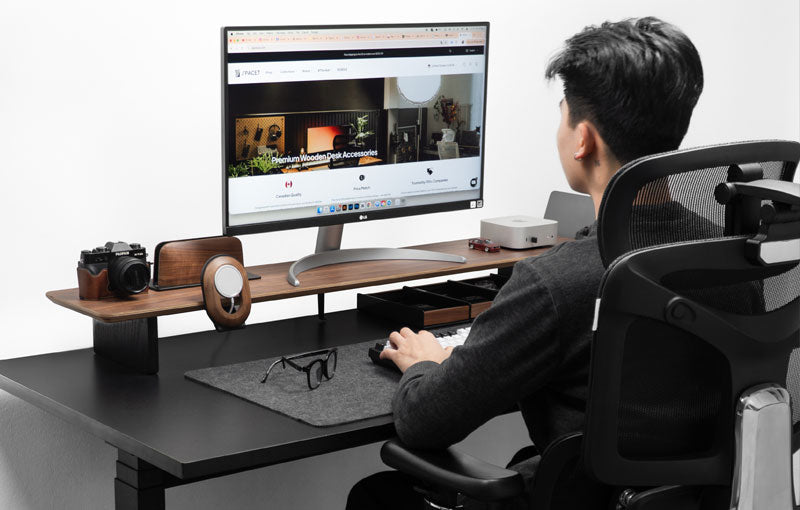
A compact monitor stand makes sense when you use one display and the rest of the desk is already relatively organized. The smaller footprint provides fixed elevation without turning most of the desktop into a shelving system.

Spacet's Monitor Stand v2.0 fits this use case. The open area below the elevated surface can also provide useful clearance for compatible everyday items.
If you are still asking what is a monitor stand, think of this format as the simplest example: the monitor remains on its original base, while the entire base rests on a raised desktop platform.
When should you buy a wider desk shelf?
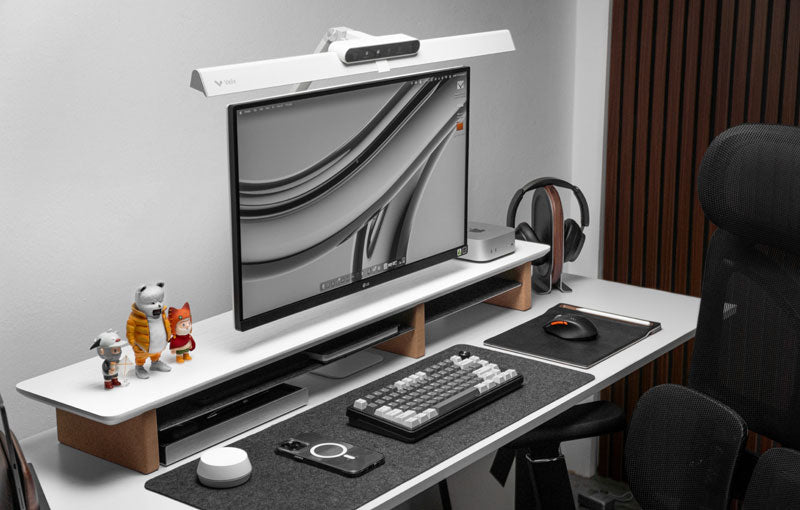
Choose a wider desk shelf when the monitor shares the workstation with a keyboard, notebook, laptop or other frequently used equipment. The wider elevated surface creates a more defined monitor zone while providing additional organization opportunities underneath.
Desk Shelf - Workspace is the Spacet option to consider when everyday organization matters alongside fixed monitor elevation.
When does a modular desk shelf make more sense?
A modular system suits workstations that are likely to change. Instead of deciding where every accessory belongs from the beginning, the desk can start with the main elevated structure and develop as equipment requirements become clearer.
The AIRY Modular Desk Shelf follows this approach, making the system relevant to users who value adaptability rather than a completely predetermined layout.
What Should You Check Before Choosing a Monitor Stand?
Check monitor weight, original base dimensions, usable stand surface and desk dimensions before focusing on finish or additional storage. A stand can look suitable but still be a poor match when the monitor base is too deep, the equipment exceeds the supported load or the shelf leaves too little working space.
How do you know whether your monitor will fit?
Start with the physical contact point between the monitor and stand: the original monitor base.
A practical compatibility check should cover:
- Monitor weight with the original base
- Base width and depth
- Usable stand surface
- Stated load capacity
- Available desk width and depth
- Desired screen elevation
These measurements provide more useful information than monitor diagonal alone.
Does screen size determine which stand you should buy?
No. Screen size describes the display panel but does not tell you how large the original base is or how much the complete monitor weighs.
Two 32-inch monitors, for example, can use very different base designs. The best monitor stand for either display therefore depends on actual compatibility rather than a shared screen-size label.
Why does desk depth matter?
A monitor stand occupies physical depth on the workstation. If the shelf and monitor base push the display too far forward, less working area remains for a keyboard and mouse.
Consider the entire arrangement as one system:
desk depth → stand depth → monitor position → active working area
This relationship is especially important on compact desks.
Which Monitor Stand Fits Different Monitor Configurations?
Monitor configuration affects the supporting surface required. A conventional single display generally has simpler requirements, while ultrawide and dual-monitor setups require closer attention to base dimensions, equipment weight, available width and the relationship between the screen arrangement and desk shape.

What should you buy for a single monitor?
A compact fixed riser is a logical starting point for a single display when extensive storage is unnecessary. Monitor Stand v2.0 is designed around this simpler approach.
A wider shelf can still make sense with one monitor when the objective includes organizing other equipment. The number of screens should therefore guide the decision without becoming the only criterion.
What should you buy for an ultrawide display?
Ultrawide screens require model-specific checks because their original bases can vary considerably in width and depth. Larger panels can also change how much desk space remains around the display.
When choosing a monitor stand for ultrawide use, compare the exact base footprint and complete monitor weight with the stand specifications rather than assuming compatibility from the diagonal measurement.
What should you buy for two monitors?
A two-monitor arrangement requires enough usable width for both bases and adequate support for their combined weight. The workstation also needs sufficient depth to keep the two displays positioned comfortably without consuming the active keyboard and mouse area.
For this reason, wider desk shelf systems are more relevant to investigate than treating Spacet's compact Monitor Stand v2.0 as a dedicated dual-monitor product.
Should You Buy a Monitor Stand With Storage?
Storage is worthwhile when the space below or around the monitor can solve a real organization problem. A basic open riser may be enough for a keyboard, while wider shelves and integrated systems are more useful when notebooks, devices and frequently used accessories need defined positions.
When is open space below the monitor enough?
Open clearance works well when only one or two items need to move away from the main desktop periodically. A keyboard, for example, may be stored below a compatible riser when more surface area is needed for another task.
Avoid buying additional storage simply because compartments are available. An uncluttered workstation may benefit more from simplicity.
When is a wider organization system useful?
A wider system becomes relevant when several objects compete for the same working surface. Workspace provides a structured everyday solution, while the Spacet desk shelf systems provide additional formats for different organization requirements.
The purpose is not to store as much as possible. Effective desk organization keeps frequently used equipment accessible while moving lower-priority objects away from the active working area.
Should You Buy a Monitor Stand or a Monitor Arm?
Choose a monitor stand when fixed elevation and usable desktop organization are the priorities. A monitor arm is more appropriate when independent adjustment of screen height, depth or orientation is essential. The two solutions change monitor placement in fundamentally different ways.
When does a fixed stand make more sense?
A fixed stand works well when the desired screen position is relatively stable. The original monitor base remains attached, and installation is generally centered on placing the riser correctly on the desk.
The elevated surface can also provide physical organization space that a monitor arm does not provide by itself.
When might a monitor arm be more appropriate?
Consider an arm when the screen needs frequent repositioning, rotation or greater control over viewing distance. Monitor weight, mounting compatibility and desk attachment requirements then become important purchasing criteria.
Spacet's desk shelves should not be treated as substitutes for adjustable monitor arms when independent screen movement is the primary requirement.
How Do Spacet Monitor Stand Options Compare?
Spacet offers several paths depending on whether the workstation needs compact elevation, everyday organization or an adaptable desk system. Comparing products by function makes the purchase decision clearer than simply choosing the largest or most feature-rich option.
|
Spacet option |
Main purpose |
Organization |
Suitable for |
|
Monitor Stand v2.0 |
Fixed elevation |
Basic clearance |
Compact setup |
|
Desk Shelf | Workspace |
Elevation + organization |
Structured |
Everyday workstation |
|
AIRY Modular Desk Shelf |
Flexible desk system |
Expandable |
Evolving workstation |
|
Desk Shelf Pro v2.0 |
Integrated desk system |
Built-in |
More complete setup |
Users who want to compare Monitor Stands can browse the Spacet monitor stand collection, while the complete product range is more useful when the workstation also requires laptop or desk organization accessories.
What Monitor Stand Features Are Worth Paying For?
Features are worth paying for when they solve a specific workstation requirement. Larger surfaces, integrated organization and modular expansion can add practical value, but those features are unnecessary when a compact fixed riser already solves the main screen-positioning problem.

Is a larger desk shelf always better?
No. Extra width consumes desk space and may provide organization capacity that a simple workstation never uses.
Choose the smallest format that comfortably supports the intended equipment and workflow rather than automatically moving toward the largest shelf.
Should design influence your decision?
Yes, but appearance should come after compatibility and function. A useful decision order is:
Compatibility → function → organization → construction and finish → aesthetics
Following that sequence reduces the chance of selecting an attractive product that does not solve the workstation's actual limitations.
Choose a Spacet Setup Around the Way You Work
A useful monitor stand should give the workstation a clearer structure rather than simply adding another object to the desktop. Decide whether your desk primarily needs elevation, everyday organization or flexibility for future equipment, then choose the product format that supports that purpose.
Spacet offers compact risers, structured Workspace shelves and modular AIRY systems for different ways of working. By matching the product to a real desk requirement, you can build a setup where the monitor and surrounding equipment each have a deliberate place.
Contact Spacet
- Website: spacetup.com
- Email: support-en@spacetup.com
-
Location: Toronto, Canada


Share: