


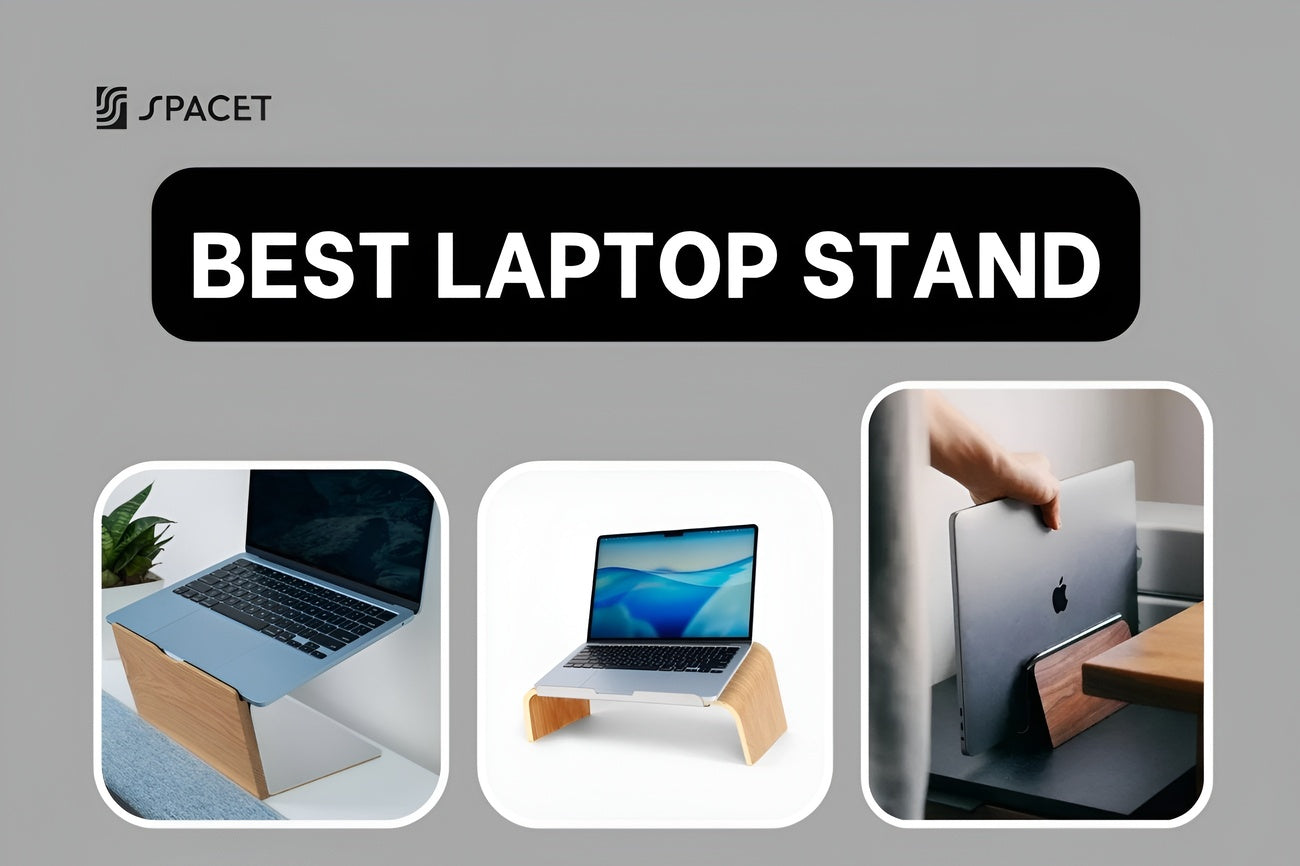
If you spend long hours working on a laptop, you already know the feeling of a tight neck, sore shoulders, eyes straining at a screen that sits way too low. A good laptop stand fixes all of that by raising your screen to eye level, and it makes your whole desk look cleaner in the process. Spacet is one of the brands doing this particularly well. Below, we rounded up the best laptop stands across every category, budget, and use case.
Why you need a laptop stand
Laptops are built for convenience, not long-term comfort. When you place one flat on your desk, you naturally crane your neck forward and down, putting constant pressure on your spine over hours of work.

Over time, that adds up to neck pain, shoulder tightness, eye strain, and even chronic lower back pain, all very common complaints among people who work from home or in an office all day. A laptop stand for desk use changes that by bringing your screen up to where your eyes naturally rest.
Beyond ergonomics, a laptop riser also opens up the space underneath your laptop. That's where you can tuck your keyboard, route cables, or stash a wireless charging pad. A nice laptop stand does more than improve posture, it makes your whole setup look a lot more intentional and organized.
Types of laptop stands
Before you buy, it helps to know what kind you actually need. Each type solves a different problem.
- Fixed laptop riser: Raises your laptop to a set height. Usually made from solid wood or aluminum. Stable, looks great, and works best for a permanent desk setup where you always use an external keyboard.
- Adjustable laptop stand: Lets you change the height and tilt angle. Great if you switch between sitting and standing, or if you need to fine-tune the position for your body and desk height.
- Vertical laptop dock: Holds your laptop upright like a book, saving the most desk space. Best when you use your laptop as a second screen next to an external monitor.
- Portable laptop stand: Folds flat and fits in your bag. Designed for people who work from different places, like cafés, co-working spaces, or on the road.
Top 8 best laptop stands right now
Here are the top laptop stands we reviewed, covering every type and budget:
- Spacet Laptop Riser v2.0
- Spacet Laptop Stand v2.0
- Spacet Laptop Dock v2.0
- Rain Design mStand
- Twelve South Curve Flex
- Roost V3
- Nexstand K2
- Lamicall Adjustable Laptop Stand
1. Spacet Laptop Riser v2.0
Best for: A permanent desk setup where you always work with an external keyboard and mouse.
Material: 15-layer walnut, oak, or maple hardwood, aluminum frame, felt lining.
If you are looking for the best laptop stand for desk use that also looks genuinely beautiful, the Laptop Riser v2.0 from Spacet is worth looking at first. It raises your laptop to a fixed height with no adjustments, which sounds limiting but is actually one of its strengths, no moving parts, no wobble, with the felt-lined interior protects your laptop's finish.

This is a cool laptop stand in the truest sense. It fits cleanly into a premium desk setup and pairs well with Spacet Desk Shelf Pro v2.0, where your laptop sits elevated on top and your keyboard, cables, and accessories live neatly underneath.
Pros:
- Solid hardwood construction gets better looking over time.
- Extremely stable, no wobble even with heavy typing nearby.
- Felt lining protects your laptop from scratches.
- Designed to work within the Spacet Premium Collection 2.0 ecosystem.
Cons:
- Fixed height, cannot adjust.
- Not portable, designed for a permanent setup.
Best fit: Home office or desk workers who prioritize clean materials and a consistent aesthetic.
2. Spacet Laptop Stand v2.0
Best for: People who want a nice laptop stand that works both with an external keyboard and for occasional direct typing.
Material: 15-layer walnut, oak, or maple hardwood, aluminum, vegetable-tanned leather stop.
The Laptop Stand v2.0 sits at a gentle angle, similar to the Rain Design mStand but made from handcrafted hardwood. The front stopper is wrapped in vegetable-tanned leather, keeping your laptop in place without leaving any marks on the chassis. It fits laptops from 10 to 17.9 inches, including larger MacBook Pro models.

Both the Riser and the Stand belong to Spacet's Premium Collection 2.0, meaning they share the same proportions, finishes, and design language as the rest of the lineup. If you are building a cohesive desk setup piece by piece, everything from the desk shelf to the headphone stand will look like it belongs together.
Pros:
- Angled platform allows more comfortable direct typing than a flat riser.
- Leather stop grips the laptop firmly without scratching.
- Fits 10 to 17.9 inch laptops.
Cons:
- Fixed angle and height, no adjustment.
- Not portable.
Best fit: People who split their time between an external keyboard and typing directly on their laptop.
3. Spacet Laptop Dock v2.0
Best for: MacBook and ultrabook users in a dual-screen setup.
Material: Walnut, oak, or maple hardwood, cork lining, aluminum.
If you already use an external monitor as your main display, a vertical dock is a smarter choice than a flat riser. The Laptop Dock v2.0 stands your laptop upright, reclaiming almost all the desk space your laptop would normally take up when open. The slot is lined with cork to protect your laptop's sides, and the dock holds the machine firmly without clips or straps.
Spacet also offers the Dual Laptop Dock v2.0 for users who need to dock two devices at once. This is rare in the premium wood accessories space and works well for professionals or creatives who regularly switch between machines.

Pros:
- Frees up significant desk space in a dual-screen setup.
- Cork lining protects your laptop finish.
- Available in four colors: Black Walnut, Oak, Maple, and All Black.
Cons:
- Only works with an external monitor, the lid must stay closed.
- No height adjustment.
Best fit: MacBook users in a dual-monitor setup who want to keep their desk as open as possible.
4. Rain Design mStand
Best for: MacBook users who want the best MacBook stand in aluminum, with a clean fixed-height design.
Material: Single-piece anodized aluminum.
The Rain Design mStand has been on best laptop stand lists for years, and it has earned that spot. The entire stand is bent from one solid piece of anodized aluminum, no joints, no screws, no assembly. It raises your laptop by a fixed 5.9 inches (150mm), which hits the right eye level for most people working at a standard desk height.
The aluminum body doubles as a passive heat sink, drawing warmth away from your laptop during use. There is also a cable management hole at the back to keep your charging cable from running across the desk, and enough clearance underneath to store a compact keyboard when not in use.

Pros:
- Minimal, elegant design that matches MacBook's aesthetic.
- Extremely stable thanks to the wide base and single-piece construction.
- Good passive cooling, built-in cable routing slot.
Cons:
- Fixed height, cannot be adjusted for taller or shorter users.
- Not portable, does not fold.
Best fit: MacBook users who want a permanent, polished desk setup with a reliable best laptop riser at a reasonable price. Many consider this the best notebook stand you can buy at this price point if you do not need portability or height adjustment.
5. Twelve South Curve Flex
Best for: MacBook users who need an adjustable stand that also folds flat for travel.
Material: Matte-painted aluminum, silicone pads.
The Twelve South Curve Flex is the most flexible stand on this list in terms of literal movement. It has two articulating hinges that let you dial in both the tilt angle and height, raising your laptop screen up to 22 inches. That matters especially if you work next to an external monitor and want your laptop webcam at a consistent eye level for video calls.
When you are done, it folds nearly flat and slides into the included neoprene travel sleeve. The hinges are intentionally stiff, which means you need to take your laptop off before repositioning, but it also means the stand does not drop or shift once set.

Pros:
- Height and angle adjustable up to 22 inches.
- Folds flat, comes with a travel sleeve.
- Silicone pads prevent scratches.
Cons:
- Higher price relative to simpler stands.
- Stiff hinges require two hands to adjust.
- Larger footprint on the desk when fully extended.
Best fit: MacBook users who split time between home and the office, café, or travel, and need a top laptop stand that works well in both settings.
6. Roost V3
Best for: Digital nomads and frequent travelers who need a best rated laptop stand that weighs almost nothing.
Material: Glass-fiber reinforced nylon composite, TPU rubber grips.
The Roost V3 is consistently ranked as one of the best portable laptop computer stands for people who are always on the move. It weighs just 165 grams, folds down smaller than a pen, and yet holds a 16-inch MacBook Pro without any flex. Seven height settings cover a wide range of desk and body types, and the TPU rubber grips are soft enough to protect aluminum laptop finishes from any marks.
The material is glass-fiber reinforced nylon, which is significantly stronger than standard plastic. The open frame design also means your laptop's bottom is fully exposed to airflow, which helps with cooling during heavy work sessions.

Pros:
- Ultra-light at 165g, folds smaller than most pens.
- 7 height settings, TPU rubber grips protect laptop finish.
- Fully open design for good airflow and cooling.
Cons:
- Expensive for a plastic stand.
- Does not fit laptops thicker than 0.75 inches (19mm).
Best fit: Digital nomads, frequent business travelers, and freelancers who need a good laptop stand that actually fits in a bag.
7. Nexstand K2
Best for: Budget-conscious buyers who want a portable stand without spending much.
Material: Fiber-glass reinforced nylon.
The Nexstand K2 looks almost identical to the Roost V3 and works on the same principle, but costs about a third of the price. It offers eight height settings (one more than the Roost), a slightly larger frame that can accommodate thicker laptops, and a folding design that packs away easily. For most people, this is a perfectly good laptop stand that checks all the boxes without a premium price.
The material feels a bit stiffer and less refined than the Roost, and the contact points are harder plastic rather than soft rubber. For thin aluminum laptops, that is worth thinking about. But for the majority of users, the Nexstand K2 delivers around 90% of what the Roost offers at a fraction of the cost.

Pros:
- Very affordable for a portable, adjustable stand.
- 8 height settings, supports thicker laptops than the Roost.
- Folds flat, easy to carry.
Cons:
- Material quality and feel are a step below the Roost.
- Harder contact points, requires extra clips for ultra-thin laptops.
Best fit: Students, people just getting started with a home office, or anyone looking for a best buy laptop stand at a minimal price. If you just want a solid, no-frills best laptop riser that travels easily, the K2 delivers that.
8. Lamicall Adjustable Laptop Stand
Best for: People who need an adjustable laptop stand for desk use and want to stay within a moderate budget.
Material: Aluminum alloy, rubber pads.
Lamicall shows up in nearly every roundup of the best laptop computer stands in the mid-range, and for good reason. The stand is made from aluminum alloy, supports laptops from 10 to 17.3 inches, and has both tilt and height adjustment within a reasonable range.
The diamond-cut open design improves airflow under the laptop, and rubber pads on the base and platform keep everything in place without marking your desk or your machine. The adjustment hinge is firm, stiff enough that it does not shift on its own, but that also means it takes two hands and a little force to reposition. Not a deal-breaker, just something to know.

Pros:
- Solid value for an adjustable aluminum stand.
- Supports laptops up to 17.3 inches, including gaming models.
- Open frame design promotes airflow.
Cons:
- Stiff hinge, not convenient for frequent adjustments.
- Not portable, does not fold.
Best fit: Home or office workers who want a reliable, adjustable laptop stand for desk use without spending much. It is also a sensible best buy laptop stand if you just need something dependable for your desk and are not concerned about portability.
Pair your laptop stand with a desk shelf
A laptop stand solves your screen height. A desk shelf solves everything else. When you combine the two, your desk goes from functional to genuinely well-organized, with a clear place for every cable, accessory, and tool you reach for daily.
The Desk Shelf Pro v2.0 from Spacet is an all-in-one shelf with a built-in lower tier. It is made from 15-layer walnut hardwood with an aluminum frame, holds up to 100kg, and comes in two widths: Medium (80cm) and Large (117cm). Place a Laptop Riser v2.0 on top and you get a two-level desk setup where the laptop sits elevated and everything else is tucked neatly below.

The AIRY Modular Desk Shelf is the more flexible option. It uses a mounting grid system that lets you attach add-ons like a Laptop Dock, Laptop Riser, headphone holder, and tablet stand directly to the shelf frame, no extra hardware needed. It is the better pick if you want to start simple and build out your setup over time.

The Pro v2.0 is ready to go right out of the box. The AIRY Modular is a foundation you build on. Either way, both connect naturally with the full Spacet ecosystem.
>> Explore our Desk Shelf System, where we offer a range of desk shelf and desk accessories designed to work together.
How to choose the right laptop stand
- Permanent home or office desk, care about materials: Spacet Laptop Riser v2.0 or Laptop Stand v2.0. Walnut hardwood gets better over time and integrates into the full Spacet setup cleanly.
- Use laptop alongside an external monitor: Spacet Laptop Dock v2.0 or Rain Design mStand. Both free up desk space and keep things tidy.
- Work from home and also from cafés or the office: Twelve South Curve Flex. It adjusts and folds, so it works just as well on a desk as it does in a bag.
- Always on the move, need ultra-light: Roost V3. The best laptop stand for travel by a clear margin.
- Want portable without the premium price: Nexstand K2. Solid function, fraction of the Roost's cost.
Comparison table
| Product | Type | Material | Portable | Height Adjustable | Best for |
| Spacet Laptop Riser v2.0 | Fixed riser | Walnut hardwood, aluminum | No | No | Premium desk setup |
| Spacet Laptop Stand v2.0 | Angled stand | Walnut hardwood, aluminum | No | No | Desk setup, occasional direct typing |
| Spacet Laptop Dock v2.0 | Vertical dock | Walnut hardwood, cork | No | No | MacBook, dual-screen |
| Rain Design mStand | Fixed riser | Single-piece aluminum | No | No | MacBook, minimal aluminum look |
| Twelve South Curve Flex | Adjustable, portable | Matte aluminum | Yes | Yes (up to 22") | MacBook, hybrid workers |
| Roost V3 | Portable | Glass-fiber nylon | Yes | Yes (7 levels) | Digital nomads, travel |
| Nexstand K2 | Portable | Reinforced nylon | Yes | Yes (8 levels) | Budget portable |
| Lamicall Adjustable | Adjustable desk stand | Aluminum alloy | No | Yes | Adjustable desk use, mid-budget |
FAQs about laptop stands
Do you need an external keyboard when using a laptop stand?
Yes, for proper ergonomics. Once your screen is at eye level, typing directly on your laptop forces your arms up at an awkward angle. A wireless keyboard and mouse complete the setup and make the posture benefit real.
Is a wooden laptop stand more durable than aluminum?
It depends on the quality of the wood. 15-layer hardwood like the kind used in Spacet products is very stable, does not warp, and holds its look over years of use. Budget aluminum stands are more prone to scratches and dents from everyday wear. High-quality wood tends to age better.
Will a laptop stand work with any laptop?
Most flat and riser-style stands work with any laptop, since they do not clamp onto the machine. For vertical docks and portable stands, check the maximum thickness your laptop is before buying. The Spacet Laptop Dock v2.0 is optimized specifically for MacBooks and slim ultrabooks.
Is it worth buying a laptop stand and desk shelf together?
Yes, especially if you are building a long-term home office. The stand handles screen height and posture. The shelf handles organization and surface space. Together, they give your desk real structure, not just a collection of individual pieces.
What makes a laptop stand good for MacBook users?
The best MacBook stand protects the finish and sits at the right height. Look for soft felt or cork lining inside the slot or base, and check that the fixed height puts your MacBook screen at or slightly below eye level. Beyond function, a cool laptop stand in walnut or anodized aluminum also elevates the look of your whole setup. The Spacet lineup and Rain Design mStand are consistently recommended as the best notebook stand options for MacBook users.
Wrapping up
A laptop stand is one of the simplest upgrades you can make to your desk, and one of the most noticeable. Whether you are after the best laptop stand for desk use in premium walnut, a reliable best rated laptop stand in aluminum, the best laptop computer stand for travel, or the most packable portable option, there is a clear pick for every setup in this list.
Spacet stands out in particular for people building a permanent, high-quality workspace. The walnut laptop stands integrate with a full ecosystem of desk accessories, so your setup grows together rather than looking like random pieces. For more ideas on how to organize and improve your workspace, head to Spacet Blog.

Share: