


The best monitor stands for desk setups should match the size of your monitor, available desktop space and the way you use your workstation. A compact riser can provide simple screen elevation for a single monitor, while a wider desk shelf can add storage, organization and more room for multi-device setups.
Spacet offers monitor stands and desk shelf systems designed around different workspace needs, from compact single-screen desks to larger, expandable workstations. This guide compares stand types, sizes, weight capacity, storage and desk compatibility to help you identify the solution that fits your workspace without adding unnecessary size or features.
Which Monitor Stand Is Best for Your Desk?
The right monitor stand should match the scale and function of the workstation. Compact single-monitor desks benefit from a simple riser, while larger workstations may gain more value from a desk shelf that combines monitor elevation with storage and organization.
|
Desk setup |
Suitable Spacet solution |
Main advantage |
|
Compact single-monitor desk |
Monitor Stand v2.0 |
Simple elevation |
|
Laptop + external monitor |
Laptop Riser v2.0 |
Elevated secondary screen |
|
Expandable workstation |
AIRY Modular Desk Shelf |
Modular accessories |
|
Premium workstation |
Desk Shelf Pro v2.0 |
Integrated organization |
|
Dual-monitor desk |
Large AIRY or Large Pro |
Wider monitor capacity |
Which monitor stand works best for a compact desk?
For a single monitor on a smaller desk, a compact riser avoids occupying unnecessary width. The Monitor Stand v2.0 measures approximately 51 × 23.5 cm, raises the display by about 9 cm and supports most monitors or iMacs up to 32 inches within its rated load.

The open area beneath the stand can also hold a keyboard or small desk accessories when they are not being used.
Which stand works best for a monitor-and-laptop setup?
For a monitor-and-laptop workstation, the Laptop Riser v2.0 can elevate the laptop as a secondary screen without requiring a full-width desk shelf. Spacet specifies support for MacBooks and most laptops up to 16 inches.
The open-back design also supports ventilation, making the riser a more focused option when the laptop remains open beside the primary monitor.
Which monitor shelf works best for an expandable desk?
The AIRY Modular Desk Shelf is designed for workstations that may change over time. Its modular mounting system allows compatible accessories to be added around the shelf as devices and storage requirements evolve.
For users planning a larger multi-screen workstation, the Large version also provides substantially more width than a compact monitor riser.
Which monitor shelf works best for a premium desk?
Desk Shelf Pro v2.0 is the more integrated option for users who want monitor elevation, storage and a coordinated desk system. Medium and Large sizes make the system adaptable to different desk widths.
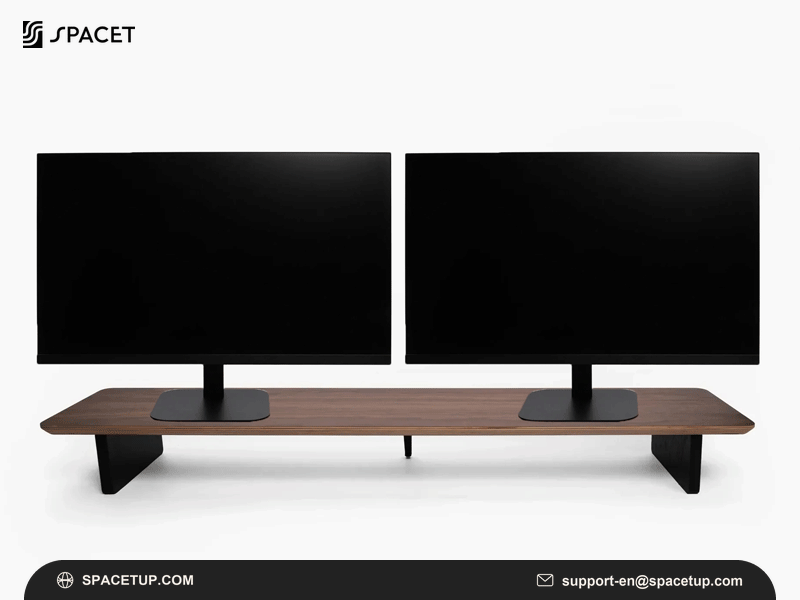
The Large configuration is particularly relevant when evaluating the monitor stands for 2 monitors, because Spacet specifies the larger Pro configuration for two monitors up to 27 inches.
What Size Monitor Stand Should You Choose for Your Desk?
Monitor stand size should be based on the physical monitor base and available desktop rather than diagonal screen size alone. A stand must provide enough usable surface for the base while leaving sufficient depth for the keyboard, mouse and other equipment used throughout the day.
How wide should a monitor stand be for one monitor?
Measure the widest part of the monitor base first. The stand surface should accommodate that footprint without placing the base close to an unsupported edge.
A compact riser is often sufficient when one fixed monitor is the only display on the desk.
How wide should a desk shelf be for two monitors?
Two-monitor workstations require the combined footprint of both monitor bases to be considered. Screen angles and the distance between displays can also change the amount of shelf width required.

Spacet's Large AIRY and Large Pro configurations are designed for two monitors up to 27 inches, making them more appropriate for larger dual-screen desks than a compact riser.
How should desk width affect monitor stand size?
A monitor shelf should remain proportionate to the desk instead of extending across every available centimeter. Side clearance can help preserve room for speakers, lamps and other equipment.
Users comparing sizes can review Spacet's desk shelf comparison before selecting a configuration.
What Features Matter Most in a Desk Monitor Stand?
The most important features are usable dimensions, weight capacity, elevation, storage and construction. Each feature should solve a practical requirement in the workstation. A larger or more expensive stand does not automatically provide better value if the extra surface area or storage remains unused.
How much weight should a monitor stand support?
Check the actual weight of the monitor and compare that figure with the manufacturer's rated capacity. Accessories placed on the same shelf should also be included when considering the total load.
A high load rating should not be interpreted as support for additional monitors unless the manufacturer also confirms the required configuration.
Does monitor stand height matter?
Yes. Fixed-height monitor stands raise the screen by a predetermined amount, so the current screen position should be evaluated before buying.
This is also why are monitor stands worth it has no universal answer. A riser adds useful value when elevation or desk organization needs improvement, but additional height may be unnecessary when the display is already positioned appropriately.
Is storage underneath a monitor stand useful?
Under-stand storage can recover desk area that would otherwise be occupied by a keyboard, notebook or small accessories. Wider desk shelves can provide even more separation between the main working surface and frequently used equipment.
Storage becomes particularly useful when the desk needs to support both a monitor and several peripheral devices.
Should You Choose a Monitor Stand, Desk Shelf or Monitor Arm?
A monitor stand provides fixed elevation, a desk shelf combines elevation with wider organization, and a monitor arm provides greater screen adjustment. The best format depends on whether the priority is simplicity, storage or independent screen positioning rather than on appearance alone.
When is a compact monitor stand better?
A compact stand makes sense for a single fixed monitor when the user mainly wants additional height and some usable space underneath.
The simple construction also avoids the mounting requirements associated with monitor arms.
When is a desk shelf better?
A desk shelf becomes more useful when organization is as important as elevation. Wider surfaces can accommodate larger workstation layouts, while the space underneath can separate accessories from the primary working area.
Desk shelves also create a consistent foundation for monitor, laptop and accessory placement.
When is a monitor arm better?
A monitor arm is preferable when the display needs frequent height, tilt, swivel or rotation adjustments. Monitor arms can also remove the original monitor base from the desktop.
Users planning three displays may therefore find a dedicated multi-screen mounting system more appropriate than a shelf alone; a triple monitor stand comparison should focus heavily on mounting capacity and independent screen positioning.
Which Monitor Stand Fits Different Desk Setups?
Different workstations require different levels of support and organization. A compact home-office desk may need only one riser, while a larger professional setup may benefit from a wide shelf and accessory ecosystem. Matching the stand to the actual workflow prevents unnecessary size and cost.
What works for a small home-office desk?
Start with the monitor footprint and available desk depth. Monitor Stand v2.0 provides a compact option when simple elevation is the primary goal.
If the same compact desk also needs storage for pens, cables and small essentials, the Desk Tray Drawer v2.0 can add under-shelf organization without occupying more of the primary work surface.
What works for a monitor-and-laptop setup?
When the laptop is used as a second active screen, Laptop Riser v2.0 raises the device while keeping the primary monitor on its own stand. When the laptop stays closed, Laptop Dock v2.0 stores it vertically to recover desktop space.
This creates two distinct routes for the same monitor-and-laptop workstation: elevate the laptop for active use or dock the laptop vertically when the external monitor becomes the primary display.
What works for a dual-monitor workstation?
Large AIRY and Large Pro are the stronger Spacet directions for a two-monitor desk. Both provide significantly more usable width than a compact single-monitor riser.
The final choice depends on whether modular expansion or an integrated premium organization system better matches the workstation.
How Should You Measure a Desk Before Buying a Monitor Stand?
Measure both the equipment and the furniture before choosing a stand. Monitor-base width and depth determine whether the display physically fits, while desk width and depth determine whether enough working area remains after installation.
What monitor measurements should you record?
Record:
- monitor-base width and depth;
- monitor weight;
- current screen height;
- desired additional elevation;
- number of displays.
For multiple monitors, measure each base rather than assuming identical dimensions.
What desk measurements should you record?
Measure total desk width and depth, then identify the space that must remain available for the keyboard and mouse. Consider speakers, lamps and other devices that share the desktop.

These measurements provide a more reliable buying guide than monitor size alone.
What Should You Check Before Buying a Monitor Stand for a Desk?
A monitor stand should fit the monitor, desk and daily workflow simultaneously. Check physical dimensions and load capacity first, then compare organization and adjustment features.
|
Check |
Why it matters |
|
Monitor base |
Must fit the usable stand surface |
|
Monitor weight |
Must remain within rated capacity |
|
Desk width |
Determines suitable stand width |
|
Desk depth |
Preserves working area |
|
Stand height |
Determines screen elevation |
|
Monitor count |
Changes required surface width |
|
Storage |
Helps determine riser vs desk shelf |
|
Adjustment |
Helps determine stand vs monitor arm |
Do not choose a monitor stand from diagonal screen size alone. Base dimensions, monitor weight and available desk space provide a more accurate picture of compatibility.
Frequently Asked Questions About Monitor Stands for Desks
What type of monitor stand is best for a desk?
A compact riser is best when one monitor only needs fixed elevation. A desk shelf is more appropriate when the workstation also needs storage, additional width or room for multiple devices. Monitor arms are better when frequent screen adjustment is the priority.
Is a monitor stand good for a small desk?
Yes, provided the stand footprint does not reduce essential keyboard and mouse space. Compact risers can even recover usable surface area by creating storage underneath.
Can a monitor stand hold two monitors?
Some wider desk shelves can accommodate two monitors, but compatibility depends on usable width, monitor-base dimensions, total weight and manufacturer specifications. Never assume dual-monitor support from load capacity alone.
Is a monitor stand better than a monitor arm?
Neither format is universally better. A fixed stand emphasizes simplicity and storage, while an arm emphasizes screen movement and desktop clearance.
How Can Spacet Help You Build a More Organized Desk?
Spacet brings monitor elevation, storage and desk organization into a coordinated workspace system. From compact monitor stands to wider desk shelves and modular accessories, the range gives users different ways to organize a desk around their available space, equipment and daily workflow.
Start with the dimensions and devices already on your desk, then add only the functions your workstation needs. Spacet products such as the Monitor Stand v2.0, Laptop Riser v2.0, Laptop Dock v2.0 and Desk Tray Drawer v2.0 address different elevation and organization needs without requiring every setup to use the same desk shelf system.
Contact Spacet
- Website: spacetup.com
- Email: support-en@spacetup.com
- Location: Toronto, Canada



Share:
Best Triple Monitor Stand: How to Choose the Right 3-Screen Setup