


The best triple monitor stand should support the weight and mounting requirements of three displays while providing enough flexibility for comfortable screen positioning. Depending on the workstation, the right solution may be a dedicated three-screen mount, separate monitor arms, or a desk-shelf-based setup for better organization.
Spacet helps address the wider workspace around a three-monitor configuration with desk shelves, monitor elevation and modular organization solutions. This guide explains how to compare mounting types, VESA compatibility, weight capacity, desk dimensions and screen layouts while showing how the right desk foundation can keep a multi-monitor workstation functional and organized.
What Is the Best Type of Stand for Three Monitors?
The best support system depends on how the three displays need to move. A dedicated triple-monitor arm keeps all screens on one mounting structure, separate arms provide greater positioning freedom, and a desk shelf can create an organized foundation when displays use compatible arms or monitor bases.

When does a triple monitor arm work best?
A triple monitor arm works well when all three displays need to sit above the desktop without their original bases. Each mounting point should match the monitor's VESA pattern and weight.
This format is particularly useful when screen height, tilt and viewing angles need adjustment while preserving usable desk surface.
When does a freestanding triple monitor stand work best?
A freestanding system can be useful when the desk cannot accept a clamp or grommet mount. The weighted base sits directly on the desktop and supports the monitor structure without attaching to the desk edge.
The trade-off is footprint. A large supporting base may occupy valuable working space, so dimensions should be checked carefully.
When does a desk shelf work in a three-monitor setup?
A desk shelf serves a different purpose from a dedicated triple-monitor mount. The shelf can provide an organizational foundation beneath a multi-screen arrangement, particularly when monitor arms or compatible monitor bases handle the actual displays.
This distinction is important when asking are monitor stands worth it, because the value depends on whether the workstation needs screen support, storage, organization or a combination of these functions.
What Should You Check Before Buying a Stand for Three Monitors?
Compatibility should be confirmed before comparing materials, appearance or accessories. Three monitors create a larger combined load and footprint, while mounted displays may also require matching VESA patterns. Desk dimensions and mounting conditions determine whether a technically compatible stand will actually work in the available workspace.
How much monitor weight must the stand support?
Add the weight of all three displays, but also check individual monitor limits when using a multi-arm mount. A system may have both a total capacity and a maximum load for each arm.
Never assume that a high total weight rating automatically means the product supports three monitors.
Which VESA patterns should you check?
Many monitor mounts use common VESA patterns such as 75 × 75 mm or 100 × 100 mm. Check the mounting pattern on every display because three monitors in the same workstation are not necessarily identical.
The mount specifications must match the actual displays.
How wide are three monitors side by side?
Measure the physical width rather than multiplying the advertised diagonal screen size. Add the widths of all three displays, then account for gaps and any inward screen angles.
This measurement gives a much more realistic estimate of the space required across the desk.
Which Three-Monitor Layout Works Best for Different Workflows?
A three-monitor layout should reflect the tasks performed across the screens. Three horizontal displays maximize continuous horizontal workspace, while a vertical side monitor can make long documents or code easier to view. Mixed monitor sizes can also work when each display has a clearly defined purpose.

Is a horizontal three-monitor layout practical?
Yes. Three horizontal screens provide a broad viewing area for dashboards, timelines, applications and reference material.
Developers, analysts and other professionals who keep several applications visible simultaneously may benefit from this arrangement, provided the desk has sufficient width.
Is a vertical side monitor useful?
A vertical display can reduce the total horizontal footprint while creating more vertical viewing space for code, documents, messages or reference material.
A monitor arm with rotation support makes switching between horizontal and vertical orientation easier.
Can three monitors use different sizes?
Yes. Matching monitor sizes can simplify alignment, but identical displays are not required.
Users comparing the best monitor stands for 2 monitors may already focus on screen count, but a three-screen workstation makes physical width, individual weight and positioning flexibility even more important than the number of displays alone.
Is a Triple Monitor Arm Better Than a Desk Shelf?
A triple monitor arm and a desk shelf solve different problems. Monitor arms control screen position and remove monitor bases from the main desktop. A desk shelf provides fixed elevation, storage and workspace organization. Some three-monitor workstations can benefit from combining both formats rather than treating them as direct alternatives.
When should you choose a triple monitor arm?
Choose a dedicated arm when independent display positioning is the priority. Height, tilt, swivel and rotation become particularly useful when three monitors differ in size or orientation.
Check the desk mounting method, monitor weight and VESA compatibility before purchasing.
When should you use a desk shelf with monitor arms?
A shelf can organize the area beneath displays while monitor arms handle screen positioning. The combination separates two functions: arms manage the monitors, while the shelf creates storage and structure across the desk.
Spacet's desk shelf comparison provides a useful way to compare shelf dimensions and configurations before planning this type of workstation.
How Should You Measure a Desk for a Three-Monitor Setup?
Measure the monitors and desk separately before choosing support hardware. Record the physical width, weight and mounting pattern of every screen, followed by desk width, depth and mounting conditions. These measurements reveal whether the workstation has enough space for three displays without sacrificing the primary keyboard and mouse area.
What monitor measurements should you record?
Record:
- physical width and height;
- monitor weight;
- original base footprint;
- VESA mounting pattern;
- preferred screen orientation;
- desired space between displays.
For three screens, these measurements should be considered together rather than independently.
What desk measurements should you record?
Measure desk width and depth, then check desktop thickness if a clamp or grommet mount will be installed. Wall clearance can also affect monitor-arm movement.
Marking the planned monitor positions directly across the desk can reveal fit problems before purchasing new hardware.
How Can a Desk Shelf Improve a Triple-Monitor Workspace?
A desk shelf can improve the organization underneath a three-monitor arrangement even when the shelf is not designed to hold all three monitor bases. The raised structure creates separate levels for keyboards, notebooks, laptops and peripherals while helping visually organize a workstation that already contains substantial screen hardware.
How does Desk Shelf Pro v2.0 support a multi-monitor workstation?
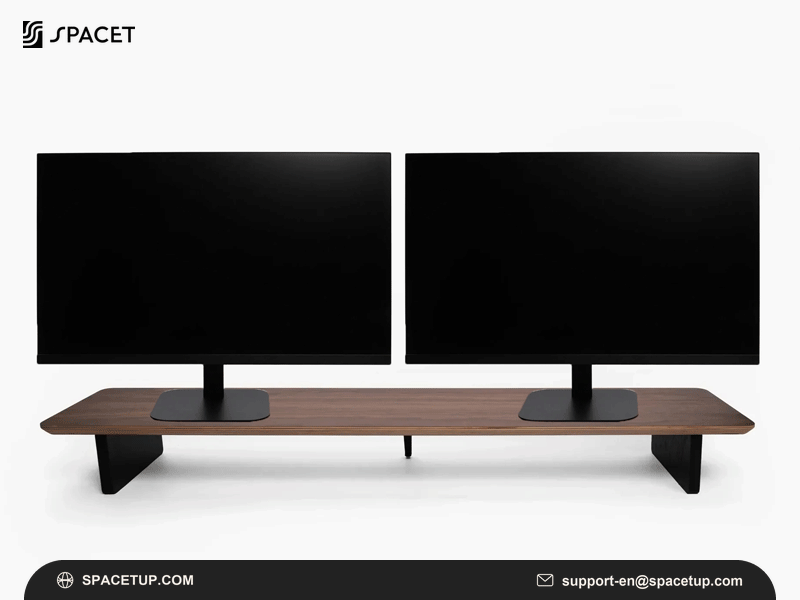
The Desk Shelf Pro v2.0 provides an integrated organization system for a larger workstation. The Large version measures approximately 117 cm wide and is specified by Spacet for two monitors up to 27 inches.

For a three-screen arrangement, Desk Shelf Pro v2.0 should therefore be treated as a workspace foundation rather than assumed to support all three monitor bases. Monitor arms or another appropriate mounting configuration can handle displays outside the shelf's stated monitor capacity.
How does AIRY Modular work around a three-screen setup?
The AIRY Modular Desk Shelf is particularly relevant when the workstation contains several devices and accessories in addition to the monitors.
The modular mounting system allows compatible accessories to be organized around the shelf, making the design useful for workstations that may change over time. The Large AIRY is also specified for two monitors up to 27 inches, so three-display compatibility should not be assumed from shelf width or load capacity alone.
What Features Matter Most in a Triple Monitor Stand?
Weight capacity, VESA compatibility and adjustment are the primary requirements for mounted displays. Stability, cable routing and desk compatibility become increasingly important as the number of screens grows. A well-planned workstation should also leave sufficient space for the keyboard, mouse and other equipment used throughout the day.
Is independent monitor adjustment important?
Independent adjustment is useful when screens have different sizes, orientations or viewing purposes. A vertical side display, for example, may require different height and rotation settings from the central monitor.
Does cable management matter with three displays?
Yes. Three displays can introduce multiple power and video cables around the rear of the workstation.
Cable routing should therefore be planned alongside monitor placement rather than after the screens are installed. Spacet's Modular Stand Collection can also be explored when building a workspace around multiple devices and accessories.
What Should You Check Before Buying a Triple Monitor Stand?
A three-monitor support system should be selected from measurable compatibility requirements rather than screen count alone.
|
Check |
Why it matters |
|
Monitor count |
Support system must accommodate three displays |
|
Monitor weight |
Check individual and total limits |
|
VESA pattern |
Must match mounting plates |
|
Physical screen width |
Determines total workspace width |
|
Desk width and depth |
Determines overall fit |
|
Desk thickness |
Important for clamp mounting |
|
Adjustment range |
Controls height, tilt and rotation |
|
Cable routing |
Three displays require more connections |
If you are deciding where to buy monitor stand hardware, prioritize sellers that provide clear dimensions, load limits, mounting requirements and compatibility information rather than choosing from appearance alone.
Build a Better Three-Monitor Workspace with Spacet
A three-monitor workstation needs enough room not only for the displays but also for the devices and accessories used around them. Spacet brings desk shelves, storage and modular organization into the workspace, helping keep a multi-screen desk structured without treating the shelf itself as a dedicated triple-monitor mount.
Start with the dimensions of the desk, monitor arrangement and mounting method, then organize the remaining workspace around those requirements. Explore Spacet workspace solutions to create a cleaner and more functional multi-monitor desk.
Contact Spacet
- Website: spacetup.com
- Email: support-en@spacetup.com
- Location: Toronto, Canada



Share:
Are Monitor Stands Worth It? Benefits, Trade-Offs and Buying Guide
Best Monitor Stands for Desk: Top Options for Every Workspace