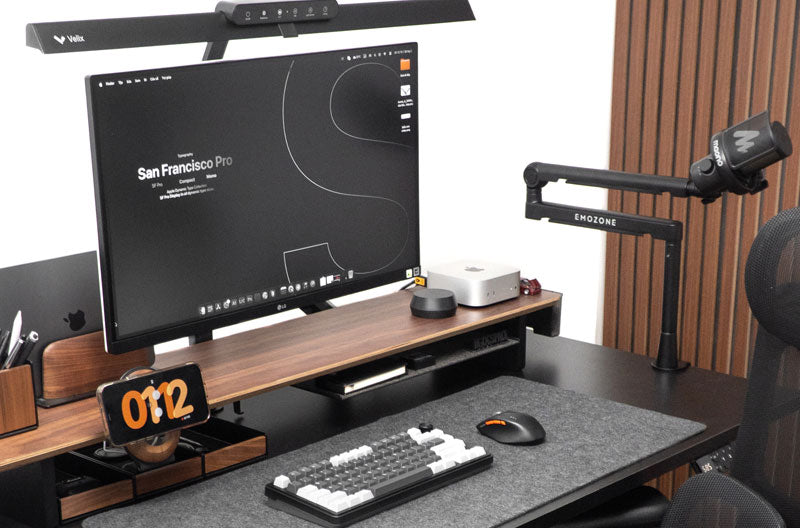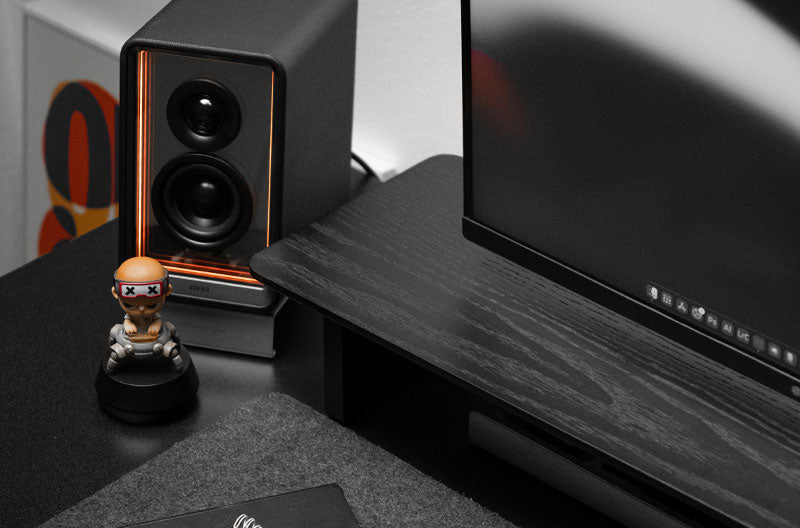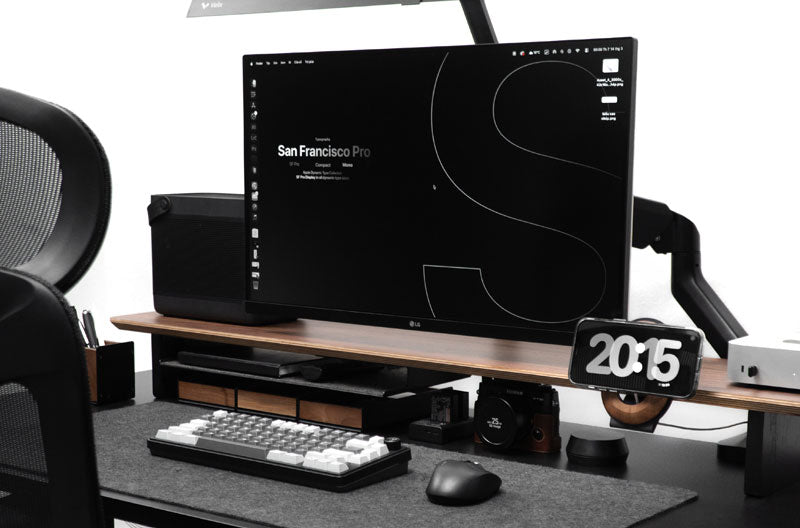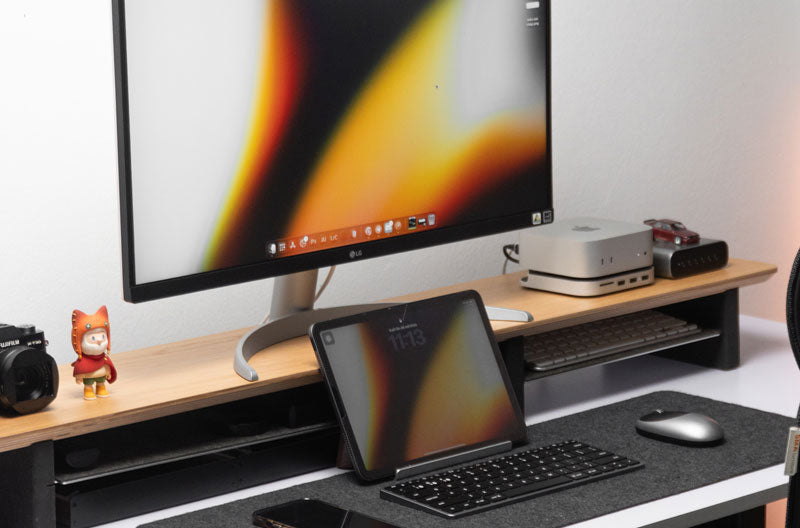
An extra large desk shelf provides an extended platform for arranging multiple monitors, organizing accessories, and maximizing usable desktop space. Choosing the right size requires considering monitor dimensions, weight capacity, and available desk space. Spacet offers wide desk shelf designs with integrated storage and modular accessories, helping users create a functional, comfortable, and well-organized workstation.
What Makes an Extra Large Desk Shelf Different?
An extra large desk shelf is a wide desktop platform intended for workstations with substantial horizontal space or multiple pieces of equipment. There is no universal industry measurement defining an extra-large shelf, so actual dimensions and equipment compatibility matter more than the size label.

How Does an Extended Shelf Change Your Desktop Layout?
An extra wide desk shelf creates a continuous elevated surface that can accommodate compatible equipment while separating smaller accessories from the main working area.
Compared with a compact monitor platform, an extended design provides more flexibility for arranging displays, speakers, and other desktop essentials. However, additional length is useful only when the workstation has enough available space.
When Is a Wider Platform Worth Considering?
An oversized desk shelf may be appropriate when a single monitor stand leaves insufficient room for adjacent equipment or when several devices compete for the same desktop area.
For users upgrading from a large desk shelf, the decision should begin with identifying which equipment no longer fits comfortably rather than simply choosing a longer product.
How Do You Measure an Extra Large Desk Shelf for Your Workstation?
Measure the usable desktop width, shelf depth, and monitor base dimensions before choosing an extended platform. A suitable shelf should accommodate the intended equipment without blocking essential accessories or interfering with normal keyboard and mouse movement.
How Much Space Should Remain Beside the Shelf?
Start by measuring the desktop's unobstructed width, including any space occupied by permanent fixtures.
For example, a 117 cm shelf centered on a 160 cm desk leaves 43 cm of horizontal space, or approximately 21.5 cm on each side.
This calculation helps determine whether the remaining space can accommodate speakers, lighting, or other accessories. The ideal clearance depends on your equipment rather than a fixed measurement.
Why Is Monitor Base Depth Important?
Monitor base footprint describes the area occupied by the monitor's supporting stand.
A wide platform may still be unsuitable if the monitor base extends beyond the available shelf depth. Measure both dimensions and check whether the supporting surface can securely accommodate the entire base.
Users planning an ultrawide monitor setup should pay particular attention to stand depth because screen width alone does not indicate how much supporting space the monitor requires.
How Does Shelf Height Affect Your Workspace?
Shelf height influences screen positioning and the amount of usable storage beneath the platform.
An 8 inch tall desk shelf measures 20.32 cm in overall height, which may provide more elevation than a lower-profile design. However, overall height does not equal usable storage clearance.
Before selecting a taller shelf, consider your monitor's existing stand height, preferred viewing position, and the dimensions of accessories stored underneath.
Can an Extra Large Desk Shelf Accommodate Multiple Monitors?
An extra large desk shelf can accommodate multiple monitors when their bases fit securely and their combined weight remains within the shelf's published load capacity. A longer platform does not automatically guarantee compatibility with every dual-monitor or ultrawide arrangement.

How Should You Arrange Two Monitor Bases?
For a dual monitor desk shelf, measure the combined width of both bases and account for their intended positions.
A primary monitor may sit directly in front of the keyboard, while a secondary display can be angled toward the user. This arrangement should preserve comfortable viewing positions without placing monitor bases beyond the supporting surface.
If the equipment uses separate monitor arms, verify that the mounting system and desk construction are compatible with the intended arrangement.
What Should You Check for an Ultrawide Display?
An ultrawide monitor shelf requires sufficient surface depth, appropriate load capacity, and stable support beneath the monitor base.
Check the monitor manufacturer's weight and stand dimensions against the shelf's specifications. Avoid assuming that a shelf designed for a wide workstation can safely support every ultrawide display.
Does a Longer Shelf Support More Weight?
Not necessarily. Desk shelf weight capacity depends on construction, materials, supporting components, and the manufacturer's specifications.
A longer surface may offer additional placement options without increasing its rated capacity. Distribute equipment according to the product's guidance and avoid concentrating heavy devices in unsupported areas.
How Can You Organize an Extra-Wide Desk Without Creating Clutter?
The most effective approach is to divide the workstation into functional areas for displays, input devices, and frequently used accessories. An extended platform becomes more practical when equipment placement supports daily tasks rather than simply filling the available surface.
How Can You Create Distinct Working Zones?
Workspace zoning helps establish clear positions for different activities.
A practical arrangement may include:
- Display zone: Monitors and essential screen-related equipment.
- Input zone: Keyboard, mouse, and writing space.
- Accessory zone: Charging devices, notebooks, and frequently used tools.
- Storage zone: Compatible items placed beneath the shelf.
These zones do not require physical dividers. Consistent equipment placement can make a wide desktop easier to navigate.
Which Accessories Belong Beneath an Extended Shelf?
Under-shelf storage works best for accessories that are useful but do not need to remain on the main working surface.
Compact notebooks, charging accessories, and smaller devices may fit beneath compatible platforms. Measure the actual available clearance before placing a keyboard or other equipment in the storage area.
Keep frequently accessed items within comfortable reach rather than filling every compartment.
How Can You Keep Cables Accessible?
Effective desk cable management should preserve access to power connections, charging ports, and frequently disconnected devices.
Route cables around the equipment layout, allowing enough slack for necessary adjustments. Avoid creating tightly packed storage areas that make connections difficult to reach.
How Can Spacet Support an Extra-Wide Desk Arrangement?
Spacet offers wide desk shelf configurations with different approaches to desktop organization. The Desk Shelf Pro v2.0 Large emphasizes integrated storage, while the AIRY Modular Large supports accessory arrangements through a compatible mounting system.
How Can Integrated Storage Support a Consistent Setup?
The Desk Shelf Pro v2.0 Large provides a 117 cm-wide platform with integrated storage beneath the elevated surface.
This configuration suits users who prefer designated storage positions for everyday accessories and a relatively consistent equipment arrangement.
Explore the Spacet Premium Collection 2.0 for available configurations and finishes.
How Can Modular Storage Adapt to Equipment Changes?
The AIRY Modular Large offers a 116 cm-wide platform with an underside mounting grid for compatible organizational accessories.
This arrangement allows users to adjust selected storage positions as their equipment and working habits change.
The Spacet modular desk shelf range provides configurations for workstations requiring flexible accessory placement.
Which Configuration Fits Your Working Style?
Instead of comparing products solely by width, consider how each storage system supports your routine.
|
Workspace priority |
Configuration to consider |
|
Consistent equipment arrangement |
Desk Shelf Pro v2.0 Large |
|
Adjustable accessory placement |
AIRY Modular Large |
|
More compact horizontal footprint |
Workspace Desk Shelf |
|
Comparing available dimensions |
Spacet shelf comparison |
The Spacet desk shelf comparison guide can help narrow your selection based on available configurations and product features.
What Mistakes Should You Avoid When Choosing an Extended Desk Shelf?
The most common mistakes involve selecting a shelf without measuring the workstation, assuming additional width means greater load capacity, and overcrowding the elevated platform. Accurate equipment measurements help prevent these problems.

Can an Extra-Long Shelf Make a Desk Less Functional?
Yes. An extra long desk shelf can reduce usable side space when its dimensions are disproportionate to the desktop.
Consider whether the shelf leaves convenient positions for lighting, speakers, and accessories that do not belong on the elevated platform.
Should You Always Choose the Widest Available Model?
No. The most suitable shelf is the one that accommodates your equipment while preserving a comfortable working area.
If you are comparing retailers and product options, Spacet's guide to finding a suitable desk shelf provides additional buying considerations before making a decision.
Design a Wide Workspace Around Your Daily Workflow
A well-planned workstation balances equipment placement, accessible storage, and comfortable daily movement. An extended desk shelf should support these priorities without occupying unnecessary desktop space.
Explore Spacet and its workspace equipment collection to discover desk shelf configurations and accessories that complement your equipment and working habits.
Contact Spacet
- Website: spacetup.com
- Email: support-en@spacetup.com
- Location: Toronto, Canada