



Most work from home problems are not productivity problems, they are setup problems. The right work from home essentials can completely change how you feel and work every day. At Spacet, we've helped thousands of WFH users build setups that are cleaner, more comfortable, and easier to stay focused in. This guide covers the essential pieces that actually make a difference.
What "Work From Home Essentials" Actually Means?
A lot of people think remote work essentials means laptop and internet and maybe a good chair. But a truly functional home office is an entire ecosystem, the chair you sit on, the light hitting your eyes, the sounds around you, whether there's a trash can within reach so papers don't pile up on your desk. Every single element contributes to how well (or how poorly) you work each day. When one thing is off, everything feels a little harder than it should.

According to Does Working from Home Work? Evidence from a Chinese Experiment by Stanford economists Nicholas Bloom, James Liang, John Roberts, and Zhichun Jenny Ying, employees working from home in a proper setup were 13% more productive than their office-based counterparts. That's not a small number. That's more than half a work day gained every week, just by getting the environment right.
Below, we've organized everything you need into a logical flow: start with the big structural decisions, build out your desk zone, add your tech, then take care of the space around you. Think of it as setting up a room from the inside out.
Part 1: Space & Foundation
1. A Dedicated Work Area
This is the single most foundational element of any WFH setup, and the one most people skip over. What you need is a fixed spot that your brain associates exclusively with work. Environmental psychology research has consistently shown that spatial cues activate corresponding mental states: when you sit down at your "work corner," your brain shifts into focus mode faster than if you work from the couch, the kitchen table, or wherever happens to be convenient that day.
If you can position this space near a window, even better. Natural light reduces eye strain, regulates your circadian rhythm, and keeps your energy more stable throughout the day. For more ideas on how to physically arrange a home office, check out Spacet Blog's guides on Home Office Setup Ideas and How to Set Up a Home Office.
2. An Ergonomic Chair
If you only spend money on one thing, spend it here. This is the most important item on the entire home office essentials list, not because it's the most exciting, but because the consequences of getting it wrong accumulate silently over months before you notice them. At home, it's disturbingly easy to sit in the same position for five or six hours straight. A bad chair in that scenario isn't just uncomfortable, it's a long-term health risk.
When choosing a chair for your WFH desk essentials, look for:
- Adjustable lumbar support that you can position at the exact curve of your lower back.
- Seat height that lets your feet rest flat on the floor with your knees at roughly 90 degrees.
- Armrests that adjust high enough to keep your shoulders relaxed (not hunched up near your ears).
- Breathable seat material, mesh or ventilated fabric, because you'll be sitting in it for a long time.
If a quality ergonomic chair isn't in the budget right now, a lumbar support pillow is a decent temporary solution while you save up. But make it a priority.
3. A Proper Desk
Your desk doesn't need to be expensive, but it needs to be big enough. The minimum recommended width for a WFH desk is around 47 inches (120cm), anything smaller and you'll constantly be shuffling things around just to make room to work. Depth matters too: at least 24 inches (60cm) so your monitor can sit far enough from your eyes (roughly an arm's length away).

If you have the option, consider a height-adjustable or standing desk. The ability to switch between sitting and standing throughout the day is one of the most consistently praised upgrades among experienced remote workers, not just for posture, but for energy levels. Even standing for 30 minutes every couple of hours makes a noticeable difference by late afternoon.
4. Good Lighting
Bad lighting causes eye strain, headaches, and even affects how you come across on video calls, all without you realizing it's the culprit. Natural light is always the best starting point. Position your desk so light comes in from the side rather than directly behind your screen (which creates glare) or in front of your face (which makes you squint).

When natural light fades or if your space doesn't have a great window, a good desk lamp with adjustable color temperature fills the gap, warm light in the evening, cooler daylight-mimicking light when you need to stay sharp. If you're on video calls regularly, a small key light or ring light dramatically improves how you look on screen for a pretty minimal investment.
5. Fast, Stable Internet
Before anything else on this list, get your internet sorted. There is no ergonomic chair, no beautiful desk setup, no productivity system in the world that compensates for a dropped video call mid-presentation or a file that won't upload because the connection is stuttering. Invest in the fastest fiber connection available in your area, and if your workspace is far from the router, run an ethernet cable directly or add a mesh WiFi node to that part of your home.
One thing a lot of people overlook: upload speed matters just as much as download speed for remote work. Downloading files, streaming, that's all download. But video calls, screen sharing, uploading deliverables, that's upload. When you're comparing internet plans, check both numbers.
Part 2: The Desk Zone
6. A Desk Shelf System, The Backbone of a Proper WFH Setup
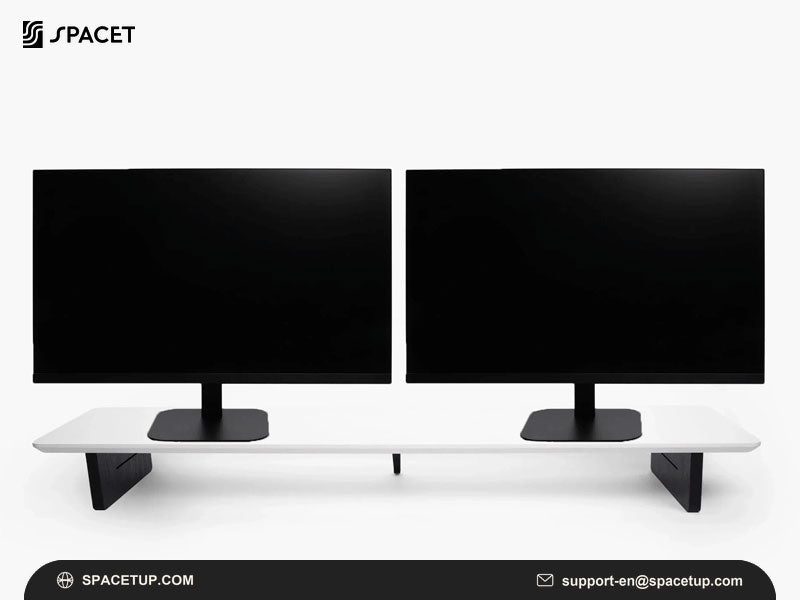
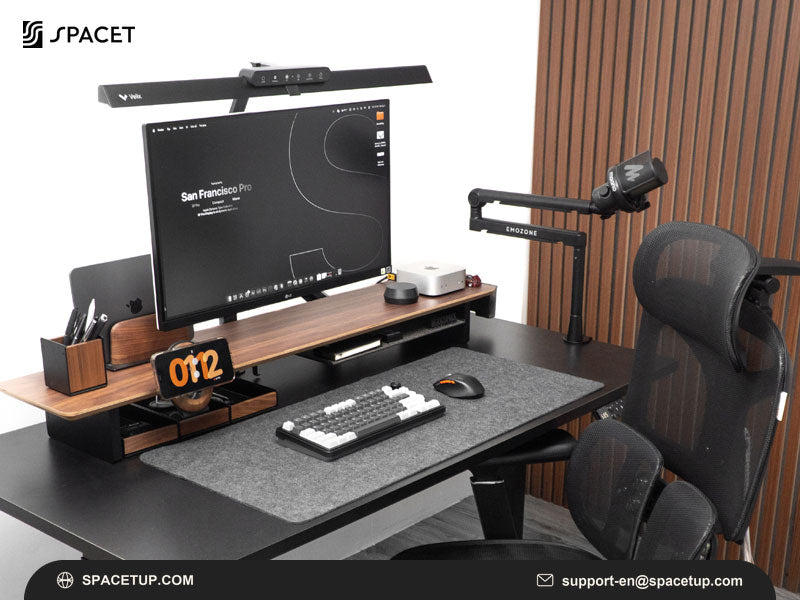
If there's one thing that transforms how a desk looks and functions at the same time, it's a desk shelf system. The idea is simple: instead of everything sitting flat on your desk competing for the same surface, you use vertical space. Your monitor goes up on the shelf at eye level. The keyboard and other accessories stay below.
Everything has a place, and your desk suddenly feels twice as large as it actually is. A desk shelf isn't just storage, it's the visual and organizational foundation that pulls the entire setup together.
Spacet has two flagship products in its Desk Shelf System collection, both rated 5 stars and consistently among its best sellers:
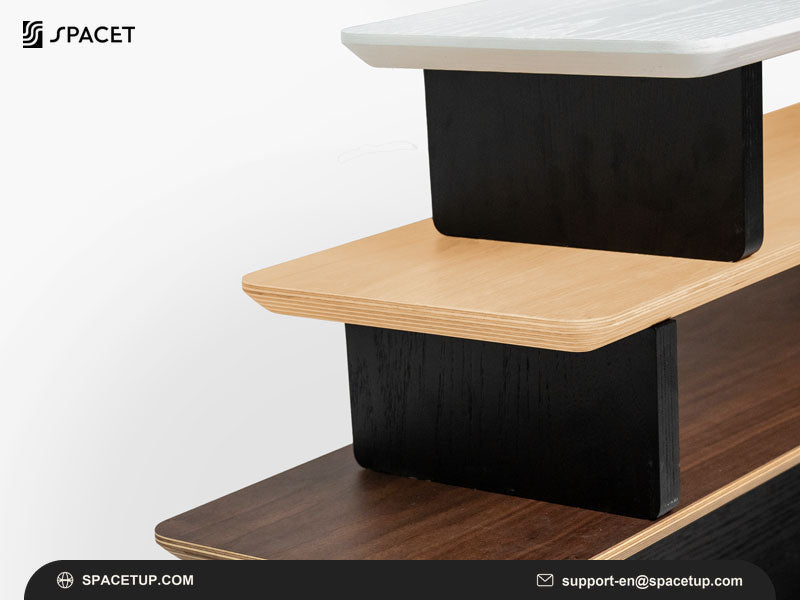
The Desk Shelf Pro v2.0 is Spacet's most refined desk shelf to date, built from 15-ply premium hardwood plywood, brushed aluminum, and natural cork, with an integrated lower shelf that creates an all-in-one workspace solution.
The upper surface holds your monitor, a small plant, speakers, or anything you want at eye level. The space underneath keeps your keyboard, dock, or accessories organized and off the main surface. Available in Black Walnut, Oak, All Black, and White Oak.

The AIRY Modular Desk Shelf is the one for people who like to customize. The modular system lets you attach add-ons directly to the shelf, laptop docks, phone holders, headphone holders, tablet holders, power strip holders, so your setup can evolve as your needs change. Buy it once, reconfigure it as many times as you want.

7. An External Monitor
Working exclusively on a 13–15 inch laptop screen for 8 hours a day is one of the most ergonomically damaging things you can do to yourself in a WFH setup, and one of the most normalized. A 24-inch or larger external monitor changes everything: less eye strain, easier multitasking, and much better posture because you're looking straight ahead instead of down at a small screen in your lap or on a low desk. If your budget allows for only one major hardware upgrade beyond your laptop, make it a monitor.
Look for an IPS panel (wider viewing angles, more accurate colors), at minimum Full HD (1920x1080) resolution, and adjustable height so you can dial in the correct eye-level position. If your work involves color-sensitive tasks like design or video editing, prioritize a monitor with strong sRGB coverage and hardware calibration support.
8. A Laptop Stand, Laptop Riser, or Monitor Stand
Even with a monitor, the way everything sits on your desk affects your posture more than you'd expect. The top edge of your screen should be roughly at eye level. Most monitors and laptops placed directly on a desk surface sit too low, which means you're tilting your head down all day, and that adds up to real neck and shoulder pain over weeks and months. A stand or riser fixes this in five minutes.
Spacet offers a full range of wood-and-aluminum stands that integrate cleanly with the rest of the collection:
- Laptop Stand v2.0: Angled platform in Black Walnut, Oak, or Maple.
- Monitor Stand v2.0: Raises an external monitor to eye level with clean under-desk storage space.
- Laptop Dock v2.0: Stands the laptop vertically when you're working off a monitor, reclaiming major surface real estate.

9. A Wireless Keyboard and Mouse
The moment you put your laptop on a stand or riser, you need a separate keyboard and mouse, there's no way around it. If your laptop is elevated to eye level and you're still typing on its built-in keyboard, you're reaching up awkwardly every time you type, which defeats the whole ergonomic purpose.
An external keyboard lets your arms rest at a natural angle with elbows at roughly 90 degrees. Wireless is almost always the better choice here, fewer cables on your desk, more flexibility in how you position things.
Mechanical keyboards (Keychron K series, for example) have become popular in the WFH community for their tactile feedback and durability. For something quieter, Logitech MX Keys or Apple Magic Keyboard are solid options depending on your ecosystem.
10. A Desk Mat or Desk Pad
It's a simple thing, but a desk pad that runs the full width of your workspace is one of those upgrades that makes the whole setup look intentional and feel noticeably better. It protects the desk surface, softens the feel of typing, and, perhaps most importantly, visually unifies all the separate items on your desk into one cohesive setup. Before and after photos of WFH setups almost always show the desk pad as the single biggest visual improvement.
Spacet offers two options:
- Japanese Desk Pad | Cotton & Linen with Cool Grey, Dark Grey, Beige, Denim Blue, All Black
- Spacet Felt Desk Pad: Soft felt material with a premium feel.

11. Desk Drawers and On-Desk Storage
A clear desk doesn't mean an empty desk, it means everything has a home. The items that tend to clutter desk surfaces (charging cables, sticky notes, paper clips, spare pens, USB drives) aren't the problem. The lack of a designated spot for them is. A desk drawer or tray under your shelf keeps all of that accessible but out of sight, so your working surface stays clean without you having to make the conscious effort every day.
Spacet's storage options:
- Desk Tray Drawer v2.0: Slim under-shelf drawer with a natural cork interior. Light Cork, Black Cork, or All Black
- The Storage Drawer: Compact standalone drawer. Black Walnut, Oak, or All Black.
- Set of 3 Storage Drawers: Bundle of three drawers, better value than buying individually.

12. A Headphone Stand
It's a small thing, but leaving headphones lying on the desk or hanging off a monitor arm damages the ear cushions over time and looks chaotic in an otherwise clean setup. A dedicated headphone stand gives them a proper home and becomes one of the nicer-looking elements on the desk. Spacet Headphone Stand v2.0 is the premium standalone option. If you're using the AIRY Modular Desk Shelf, the Headphone Holder | The Modular attaches directly to the shelf and keeps everything integrated.

13. A Phone Stand or MagSafe Stand
A phone lying flat on the desk is a surprisingly effective distraction machine, every notification lights up the full screen and pulls your eye away from whatever you were working on. Stood upright in a holder, it takes up less space and you only catch notifications at a glance rather than being pulled in. Spacet MagSafe Stand v2.0 charges and holds your iPhone simultaneously. The MagSafe Holder | The Modular attaches directly to your AIRY shelf if you're keeping the setup modular.

14. Cable Management
Messy cables are the fastest way to undermine an otherwise clean desk. A few velcro cable ties, some adhesive cable clips along the back edge of the desk, and maybe a small under-desk cable tray can take a rat's nest of wires and make it disappear. This doesn't cost much, but spending one afternoon getting it sorted will save you dozens of small frustrations over the coming months. The AIRY Modular Desk Shelf also has a Power Strip Holder | The Modular to mount your power strip directly onto the shelf and route all cords cleanly from one point.
Part 3: Tech Essentials
15. Noise-Canceling Headphones
This might be the single biggest quality-of-life upgrade you can make if you share your home with other people, live on a busy street, or do deep-focus work that requires actual concentration. Active noise cancellation (ANC) creates a bubble of quiet that you can take anywhere, whether you're writing, on a call, or just need to block out the world for a few hours. Good ANC headphones also make a dramatic difference in the quality of audio during calls, for both you and the people you're speaking with.
When evaluating headphones for your WFH office essentials, look at both the ANC performance (for focus) and the microphone quality (for calls). Sony WH-1000XM series, Apple AirPods Pro, and Bose QuietComfort series are consistently the top-rated options across the remote work community.
16. A Webcam
The built-in camera on most laptops is mediocre at best, narrow field of view, poor low-light performance, and positioned awkwardly below your eye line when your laptop is elevated on a stand. If you're on video calls regularly, a standalone webcam positioned at eye level is one of the most impactful upgrades for how you present yourself professionally. People notice the difference even if they can't articulate why, it just looks more put-together. Logitech C920s, Logitech Brio 4K, and Elgato Facecam are popular choices at different price points.
17. A USB Hub or Docking Station
Modern laptops often have just two or three ports, while a full WFH setup might need to connect a monitor, webcam, keyboard, mouse, audio interface, and charger simultaneously. A quality USB hub or docking station solves this with a single cable, plug one USB-C or Thunderbolt cable into your laptop and have instant access to every peripheral. If you use a MacBook or a USB-C laptop, look for a hub that supports pass-through charging so you can power the laptop through the same hub without needing a separate charger cable.
18. A Quality Speaker (Optional But Worthwhile)
Music is a genuine productivity tool for a lot of people, the right ambient sound can significantly improve focus, especially for repetitive tasks. Your laptop's built-in speaker is functional but flat. A small Bluetooth speaker or a pair of desktop speakers adds a richness to the audio that's hard to go back from once you've experienced it. If aesthetics matter to you (and in a home office they often do), Spacet Speaker Stands v2.0 elevate your speakers to ear level and keep the whole setup looking cohesive.

19. Software and Digital Tools
The physical workspace is only half the equation. The other half is the digital environment you work inside every day. Here are the core tools that most remote workers rely on:
- Communication: Slack, Microsoft Teams, or Google Chat for async messaging; Zoom or Google Meet for video.
- Task management: Notion, Trello, Asana, or ClickUp, pick one and actually use it consistently.
- File storage: Google Drive, Dropbox, or OneDrive for easy access and sharing across devices.
- Focus: Toggl Track or a Pomodoro timer to protect deep work blocks. Forest works well if you struggle with phone distractions.
- Security: A VPN if you work with sensitive data, and a password manager like 1Password or Bitwarden to keep everything secure without the mental overhead.
Part 4: The Space Around Your Desk
20. A Printer and Scanner
Not everyone needs one, if your work is fully digital, you can skip this. But if you regularly deal with contracts, signed documents, invoices, or anything that needs a physical signature or a scanned original, not having a printer at home is a genuine time sink. Multifunction laser printers (print, scan, copy in one unit) are the most practical choice for home offices: lower cost per page than inkjet, faster output, and minimal maintenance. Position it close enough to your desk to reach conveniently, but not so close that it crowds your workspace.
21. Document Storage and Filing
Even in 2025, paperwork exists. Tax documents, contracts, product manuals, receipts, it accumulates. Without a system, it ends up in piles on your desk, on the floor, or just lost. A simple filing system, a few labeled folders in a small desktop file holder, takes maybe 20 minutes to set up and will save you hours of hunting for documents across the next year. If you handle sensitive documents, a small paper shredder nearby is worth having too.
22. A Planner or Notebook
Digital task management apps are great for the long view. But there's a reason so many experienced remote workers also keep a physical notebook or weekly planner on their desk. Writing things by hand engages a different mode of thinking, it's better for capturing ideas quickly, roughing out plans, and working through problems when typing feels too structured. The act of physically writing a to-do list for the day also creates a kind of commitment that a checkbox in an app doesn't quite replicate.

Spacet NoteDock (from $49.90) is a thoughtful take on this, a wooden notepad holder that keeps your notes on-desk and organized without taking up extra surface space. The Spacet Note Refill Pack ($13.90) keeps you stocked.
23. A Desk Trash Can
This one sounds almost too obvious to include, but it earns its place on this list. Without a small trash can within arm's reach of your desk, paper scraps, packaging, and random waste quietly accumulates on the surface or nearby floor. A compact 3–5 liter bin tucked under or beside the desk takes care of the problem invisibly. It's one of those things you don't think about until you don't have it, and then it drives you quietly crazy.
Part 5: Nice-to-Have Self-Care Essentials
These won't make or break your productivity on day one, but if you're working from home long-term, they have a way of adding up to a meaningfully better day-to-day experience:
- A large water bottle on your desk. Dehydration is one of the most overlooked causes of afternoon fatigue and loss of focus. Having a 32oz (1L) bottle on your desk means you drink without having to think about it.
- A small plant or two. Research from the University of Exeter found that plants in a work environment can increase productivity by up to 15% and measurably reduce stress. Low-maintenance varieties like pothos, succulents, or snake plants work well in desk setups.
- Blue light blocking glasses. If you end your workdays with tired, strained eyes, blue light filtering lenses are worth trying, especially in the evening hours. Combine with Night Mode on your displays for best results.
- A footrest or anti-fatigue mat. If you have a standing desk, an anti-fatigue mat is non-negotiable. If you sit, a small footrest helps maintain proper leg position and takes pressure off the lower back over long sessions.
- A wireless charger. One less cable on the desk, and your phone stays charged without you having to think about it. Tuck it beside your keyboard or under the shelf.
- A candle or essential oil diffuser. Scent has a surprisingly strong effect on focus and mood. Peppermint and citrus are known to support alertness; lavender helps with stress. A small diffuser on the desk is an easy way to make the space feel like yours.
- A desk timer or physical clock. Having a visible timer helps apply focus techniques like Pomodoro without pulling out your phone, which is almost always a distraction. A cube timer (flip to set the duration) is a popular, low-friction option.
- Small modular add-ons for your shelf. If you're using Spacet's AIRY Modular Desk Shelf, the ecosystem of add-ons is worth exploring: the Apple Watch Holder | The Modular ($39.90), the Tablet Holder | The Modular ($39.90), and the Phone Holder | The Modular ($34.90) each add a small but genuine amount of organization to the setup.

WFH Essentials by Budget
You don't need to do everything at once. Here's how to prioritize based on what you're working with:
| Budget | Where to start |
| Under $300 | Reliable internet, a proper chair, a desk lamp, and a desk pad |
| $300–$700 | Add an external monitor, a laptop stand or riser, a wireless keyboard and mouse |
| $700–$1,500 | Add a desk shelf system, noise-canceling headphones, a drawer for storage, a headphone stand |
| $1,500+ | Premium ergonomic chair, webcam, speaker stands, full modular setup |
FAQs about Work From Home Essentials
What are the first work from home essentials to buy?
Your chair and your internet connection. These two things have the most direct daily impact on your health and your ability to do your job. A poor-quality chair causes cumulative physical damage that's expensive to treat later. Unreliable internet disrupts your work in ways no other upgrade can compensate for. Get these right first before spending on anything else.
How do I keep a WFH desk tidy without constant effort?
The key is giving everything a designated place so tidying up is automatic rather than a project. A desk shelf system with integrated storage means every item on your desk already has somewhere to go. End-of-day cleanup takes two minutes instead of feeling like a task.
Should I get a desk shelf or a monitor arm?
Both add vertical organization to your setup, but they work differently. A monitor arm gives you more precise screen positioning flexibility, while a desk shelf gives you an additional storage surface and creates a more cohesive, finished aesthetic. For most WFH users who want organization alongside ergonomics, a desk shelf is the more versatile choice, especially when paired with a good stand for the laptop.
How much does a good WFH setup cost?
A functional basic setup (assuming you already have a laptop) can be built for around $300–$500. A well-rounded mid-range setup typically lands between $800–$1,500. A premium ergonomic setup with all the right hardware can run $2,000–$3,000 or more. But as the budget breakdown above shows, you don't need to reach premium to get 80% of the benefit.
Do I actually need a printer when working from home?
It depends entirely on your work. If everything you do is digital, your deliverables, your signatures, your communication, you probably don't. But if you deal with physical contracts, tax documents, or anything that requires an original signature or a physical scan, not having a printer nearby costs you time every time the situation comes up.
When should I start investing in a proper home office setup?
From day one, if working from home is your long-term situation. There's a common mindset of "I'll do it properly once things are more settled", but every day on a bad chair with a bad screen angle is quietly accumulating wear on your body. The setup you start with tends to be the setup you keep longer than you intend to.
Conclusion
No single work from home essentials list is right for everyone. Your ideal setup depends on the type of work you do, how much space you have, and what you're willing to invest. But the logic of building it up is universal: start with space and foundation, build out the desk zone, layer in your technology, then take care of the room around you.
If you're ready to build a desk setup that actually works, one that looks great, stays organized, and supports the way you work every day, Spacet is a great place to start. The Desk Shelf System is a natural anchor for the whole setup, and everything else in the collection is designed to work together seamlessly.
If you already have your work from home essentials but aren’t sure how to arrange them into a comfortable setup, explore our Remote Desk Setup guideline for practical inspiration. You can also discover more workspace ideas, productivity tips, and home office guides on Spacet Blog to help you build a workspace that truly works for you.

Share: