


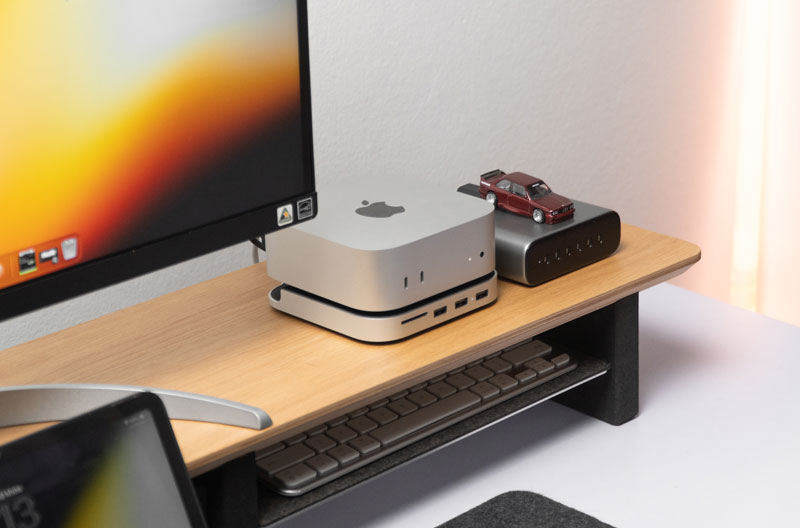
Monitor stand dimensions typically range from 20–24 inches wide, 8–12 inches deep, and 4–6 inches high for standard desktop risers. However, choosing the right size depends on your monitor base, desk space, viewing height, and storage needs. Spacet offers a variety of desk shelf solutions designed to accommodate different monitor setups while creating a cleaner, more organized, and comfortable workspace.
What Are the Standard Monitor Stand Dimensions?
Standard desktop monitor risers typically measure 20–24 inches wide, 8–12 inches deep, and approximately 4–6 inches high. However, actual dimensions vary depending on the materials, design, and intended equipment.
|
Dimension |
Common Range |
Main Consideration |
|
Width |
20–24 inches (50–60 cm) |
Monitor base and available desk space |
|
Depth |
8–12 inches (20–30 cm) |
Stability and supporting surface |
|
Height |
4–6 inches (10–15 cm) |
Screen elevation and viewing comfort |
How Wide Should a Monitor Stand Be?
The monitor stand width should accommodate the entire supporting base of your display.

A 27-inch monitor does not necessarily require a 27-inch-wide platform because screen size refers to diagonal display measurement.
Measure the monitor's actual base before selecting a riser.
How Deep Should a Monitor Stand Be?
The monitor stand depth must provide sufficient space for the monitor's supporting feet or base.
A platform measuring approximately 8–12 inches deep may accommodate many desktop monitors, but larger or unusually shaped bases require individual measurements.
How Tall Should a Monitor Stand Be?
The appropriate monitor stand height depends on the screen's current position relative to seated eye level.
Although many desktop risers provide approximately 4–6 inches of elevation, a shorter or adjustable stand may be more suitable when the monitor already sits relatively high.
How Do Monitor Stand Dimensions Differ by Type?
Monitor stands use different supporting structures. Desktop risers provide fixed platforms, VESA stands use mounting hardware, and specialized stands accommodate larger or more complex display configurations.
What Are the Dimensions of a Desktop Monitor Riser?
A desktop monitor riser typically combines a raised platform with open storage space underneath.
The elevated surface supports the monitor's original base, while the lower area may accommodate a keyboard or small accessories.
When evaluating what are monitor risers for, consider both screen elevation and the additional storage space a raised platform can create.
What Measurements Matter for a VESA Monitor Stand?
A VESA monitor stand requires compatible mounting holes, an appropriate weight rating, and sufficient adjustment range.
Common mounting patterns include 75 × 75 mm and 100 × 100 mm.
Unlike desktop risers, VESA stands support displays through mounting brackets rather than the original monitor base.
Are Ultrawide Monitor Stands Different?
Ultrawide displays may require greater stability or a higher weight capacity, depending on the monitor.
However, an ultrawide screen does not automatically require a platform matching its full display width.
Check the supporting base dimensions and manufacturer specifications.
What Monitor Stand Size Do You Need for Your Desk?
Choose monitor stand dimensions according to usable desk width, monitor base measurements, and surrounding equipment. Compact desks benefit from shorter platforms, while larger workstations can accommodate extended shelves and additional storage.
What Monitor Stand Size Works for a Small Desk?
For desks under approximately 120 cm wide, a compact desk shelf can preserve space for other accessories.

Spacet offers medium-sized options, including Desk Shelf Pro v2.0 at approximately 80 cm wide and AIRY Modular at approximately 84 cm wide.
Confirm the selected product's dimensions before purchasing.
What Monitor Stand Size Fits a Standard Desk?
Desks measuring approximately 120–140 cm wide can accommodate various medium-sized or extended monitor risers.
The Workspace Desk Shelf, approximately 107 cm wide, provides an option for users who want a longer supporting surface.
Leave sufficient space for frequently used equipment.
What Monitor Stand Size Works for a Wide Desk?
Larger desks may accommodate extended platforms for multiple devices.
Spacet's larger Desk Shelf Pro v2.0 and AIRY Modular configurations offer wider supporting surfaces.
Measure your complete workstation layout before selecting a large shelf.
What Monitor Stand Dimensions Work for Different Screen Sizes?
Monitor size alone cannot determine the correct stand dimensions. A 24-inch, 27-inch, or 32-inch display may fit a compact platform if the supporting base fits securely and the stand supports its weight.
What Size Monitor Stand Works for a 24-Inch Monitor?
A 24-inch display often works with a compact desktop riser.
However, the correct platform size depends on the monitor's supporting base rather than its diagonal screen measurement.
What Size Monitor Stand Works for a 27-Inch or 32-Inch Monitor?
Larger displays require careful consideration of base dimensions, weight, and viewing position.
A 32-inch screen may still fit a relatively narrow shelf when its supporting base is compact.
Always check the stand's stated load capacity.
How Wide Should a Monitor Stand Be for Two Monitors?
For a dual-monitor setup, measure both supporting bases and the desired spacing between them.
The combined base widths and spacing determine the minimum usable supporting width.
A wider shelf may be helpful, but monitor arms can provide an alternative arrangement.
How Do You Measure Monitor Stand Dimensions Before Buying?
Measure the monitor base, available desk surface, required screen elevation, and desired storage clearance. Comparing these measurements with product specifications helps prevent purchasing an unsuitable stand.
How Do You Measure the Monitor Base Correctly?
Measure the widest and deepest points of the monitor's supporting base.
Check the monitor's weight and compare the measurements with the stand's usable surface and maximum supported load.
How Do You Check the Correct Monitor Stand Height?
Sit comfortably with your chair adjusted to a natural working position.
The top of the visible screen should generally sit at or slightly below seated eye level.
For additional ergonomic guidance, understanding how high the monitor should be on the desk can help you assess whether a riser is necessary before selecting its height.
How Much Clearance Do You Need Under a Monitor Stand?
Under-stand storage clearance determines whether keyboards, notebooks, or other accessories can fit beneath a raised platform.
Measure the usable opening rather than relying solely on the product's overall height.
For more detailed measurement considerations, explore Spacet's guide to desk shelf dimensions.
Which Spacet Monitor Stand Size Works Best for Your Setup?
The right Spacet monitor stand depends on how much desktop space you can dedicate to screen support. A compact riser may be sufficient for one monitor, while a longer desk shelf can accommodate additional equipment or multiple displays. Compare the available surface area, monitor base dimensions, and desired elevation before choosing.
Is a Compact Monitor Stand Enough for One Screen?
A compact monitor stand is often sufficient for a single display when the monitor base fits securely on the supporting surface. Choosing a smaller platform also leaves more room for speakers, desk lamps, and frequently used accessories.
Spacet's Monitor Stand v2.0 provides a dedicated screen-support option without requiring a full-length desk shelf. Explore the Spacet Stands & Holders Collection to compare compact stand designs for different workspace needs.
How Much Space Should a Monitor Stand Leave on Your Desk?
A monitor stand should provide enough room for the display base while preserving a practical working area. For example, an 80 cm stand centered on a 120 cm desk leaves approximately 20 cm of space on each side.
Consider the position of your keyboard, speakers, and other equipment before choosing a wider platform. Spacet's guide to choosing a desk shelf length explains how different workstation layouts affect the amount of supporting surface required.
When Should You Choose a Full-Length Desk Shelf Instead?
A full-length desk shelf becomes useful when your workstation includes two monitors, a monitor and laptop, or several accessories that need dedicated space.
For example, Spacet offers larger desk shelf configurations measuring approximately 116–117 cm wide, while shorter alternatives are available for single-monitor setups. The ideal choice depends on the combined monitor base footprint, desk width, and equipment weight.
A wider shelf should solve a practical space requirement rather than simply occupy more of the desktop.
What Are the Most Common Monitor Stand Sizing Mistakes?
Common mistakes include selecting a stand based only on screen size, overlooking the monitor base, choosing excessive elevation, and ignoring load capacity.

Is a Wider Monitor Stand Always Better?
No. An unnecessarily wide platform may occupy valuable desktop space without improving monitor support.
Choose a width that accommodates your equipment while preserving usable working space.
Can a Monitor Stand Be Too Tall?
Yes. Excessive elevation can position the screen above a comfortable viewing level.
Measure your seated eye height before choosing a fixed-height riser.
Why Should You Check Weight Capacity and Stability?
A monitor stand must support the equipment placed on its surface.
Check the manufacturer's stated weight limit and ensure the supporting base fits securely within the platform.
Find the Right Monitor Stand Size With Spacet
Choosing the right monitor stand starts with accurate measurements. Compare your monitor base, desk width, viewing height, and storage requirements before selecting a desktop riser.
At Spacet, you can explore desk shelf solutions for compact home offices, minimalist workstations, and multi-device setups. Discover different sizes and organizational features to create a functional, comfortable, and visually coordinated workspace.
Contact Spacet
- Website: spacetup.com
- Email: support-en@spacetup.com
- Location: Toronto, Canada


Partager: