


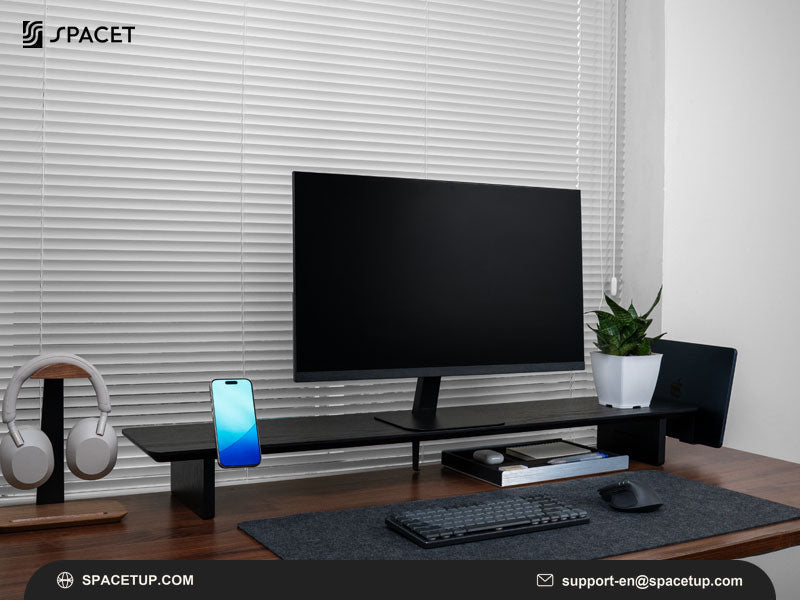
If you are wondering how much do monitor stands cost, prices can range from around $20 for a basic desktop riser to $100 or more for premium wooden models, while larger desk shelf systems can reach 150-300+. Materials, size, monitor capacity, storage and adjustability all influence the final price. Spacet breaks down these price ranges to help you understand what you are paying for and choose the right solution for your workspace and budget.
How Much Do Different Types of Monitor Stands Cost?
Monitor stands typically range from $15 to $300+, but the product category makes a major difference. Fixed desktop risers sit at the lower end, while articulating arms cost more as weight capacity and adjustment mechanisms increase. Premium monitor stands and desk shelf systems can also command higher prices because of materials, construction and workspace organization features.
|
Monitor stand type |
Typical price range |
Best for |
|
Basic desktop riser |
15-35 |
Simple height adjustment |
|
Standard articulating arm |
25-60 |
Single or dual monitors |
|
Heavy-duty/ultrawide arm |
60-150 |
Large and heavy displays |
|
Premium stand/desk shelf |
100-300+ |
Long-term, organized desk setups |
How much does a basic desktop monitor riser cost?
Basic desktop risers generally cost around 15-35. These stationary platforms are commonly made from plastic, metal, engineered wood or bamboo and sit directly on the desk without requiring a clamp or mounting system.

A basic riser makes sense when the primary goal is raising a single display and creating a small amount of usable space underneath.
How much does an articulating monitor arm cost?
Standard articulating monitor arms commonly fall around 25-60, depending on monitor capacity and adjustment mechanism. Many attach to the desk using a C-clamp or grommet and allow greater positioning flexibility than a fixed desktop riser.
Single-monitor arms generally cost less than dual-monitor configurations because supporting additional screens requires more hardware and structural capacity.
How much does a heavy-duty monitor arm cost?
Heavy-duty monitor arms designed for large or ultrawide displays commonly cost around 60–150 or more. Stronger steel construction, higher weight capacity and more robust gas-spring mechanisms contribute to the higher price.
Monitor size alone should not determine compatibility. Always check the manufacturer's stated weight capacity and supported dimensions before purchasing an arm for a large display.
How much does a premium monitor stand or desk shelf cost?
Premium desktop monitor stands can exceed $100, while larger desk shelf systems may reach 150-300+ depending on materials, dimensions, storage and modular features.
Unlike a mechanical monitor arm, a premium desk shelf combines monitor elevation with workspace organization. For example, Spacet's Monitor Stand v2.0 creates additional usable space beneath the display, while larger desk shelf systems provide room for monitors, laptops and everyday desk accessories.
What Factors Affect the Price of a Monitor Stand?
Materials, dimensions, load capacity, storage and modular features are among the main factors behind monitor stand pricing. Two products that appear similar in photos may serve very different purposes once construction quality, usable surface area and compatibility with other desk accessories are considered.
How do materials affect the cost?
Plastic and simple metal mesh are common in budget risers. Engineered wood provides another accessible option, while hardwood plywood, solid wood and aluminum are more common as prices increase.
|
Material |
Typical positioning |
Main consideration |
|
Plastic |
Entry level |
Lightweight and simple |
|
MDF/engineered wood |
Entry–mid range |
Lower-cost wood appearance |
|
Steel/aluminum |
Mid–premium |
Stability and structural support |
|
Premium wood |
Premium |
Finish, durability and desk aesthetics |
Material choice matters particularly when a monitor stand will become a permanent part of a carefully designed workspace.
How do size and monitor capacity affect the price?
A small platform supporting one monitor requires less material than a long shelf intended for a dual-monitor configuration. Larger designs also need enough structural strength to remain stable under heavier equipment.
Before buying, check monitor weight, base dimensions, stand width and available desk depth.
How do storage and modular features change the cost?
Drawers, trays, device holders and mounting systems add functionality beyond raising a monitor. These features can increase the initial price but may reduce the need for several unrelated desktop organizers.
A modular system can be particularly useful when a workspace changes frequently because compatible accessories can be added as new devices enter the setup.
What Monitor Stand Can You Expect at Each Budget?
A lower budget generally covers straightforward monitor elevation, while higher price points introduce better materials, more workspace, storage and ecosystem compatibility. The right spending level therefore depends on whether you need one functional riser or want the monitor stand to become the foundation of a complete desk setup.
|
Budget |
What you can generally expect |
Suitable for |
|
20-50 |
Basic fixed or adjustable riser |
Simple single-monitor setups |
|
50-100 |
Better materials, size or storage |
Everyday workstations |
|
100-150 |
Premium stand or larger organization features |
Permanent desk setups |
|
150-300+ |
Full desk shelf systems and modular options |
Multi-device organized workspaces |
Prices vary by brand, materials, configuration and promotions, so these ranges work best as shopping benchmarks rather than fixed rules.
When is a basic monitor stand enough?
A basic stand can be completely adequate for one monitor, limited desktop equipment and minimal storage requirements. There is little reason to pay for modular features when the workstation does not need them.
What do premium desk shelves add?
A premium desk shelf expands the function from screen elevation to workspace organization. A longer shelf can create room underneath for a keyboard, notebook or accessories while providing a structured surface for one or more displays.
Spacet's Desk Shelf System illustrates this difference with Workspace, AIRY Modular and Pro v2.0 options designed around different levels of storage, materials and expandability.
Is a More Expensive Monitor Stand Worth the Extra Cost?
A higher-priced monitor stand can be worth the investment when the additional cost provides features you will regularly use, such as greater stability, premium materials, wider monitor capacity, storage or modular organization. For a simple single-monitor desk, however, an inexpensive riser may already provide the necessary functionality.

When does a premium desk shelf make more sense?
Consider a larger desk shelf when the workstation includes multiple devices or when desk organization is as important as monitor height.
A desk shelf is particularly relevant for:
- permanent home-office setups;
- monitor-and-laptop combinations;
- dual-monitor workstations;
- keyboards and accessories that need storage;
- coordinated minimalist workspaces;
- setups expected to evolve over time.
The objective is not to buy the most expensive product. The objective is to pay for features that solve actual workspace problems.
Should You Buy a Monitor Stand, Monitor Arm or Desk Shelf?
A monitor stand is usually the simplest choice for fixed elevation, a monitor arm provides greater screen-positioning flexibility, and a desk shelf combines monitor elevation with a larger organization surface. Choosing among the three depends on how much adjustment, storage and usable desk space the workstation requires.
|
Solution |
Main purpose |
Organization |
Positioning flexibility |
|
Monitor stand |
Raise a display |
Low–medium |
Low–medium |
|
Monitor arm |
Reposition a display |
Frees desk surface |
High |
|
Desk shelf |
Raise and organize |
High |
Depends on design |
A monitor arm works well when frequent screen adjustment is the priority. A desk shelf makes more sense when the goal includes creating a structured home for monitors, laptops and everyday accessories.
How Do You Choose the Right Monitor Stand for Your Budget?
Start with compatibility rather than price. Measure the monitor base and available desk area, confirm the required weight capacity, and determine how much elevation is actually needed. Then consider whether storage, premium materials or modular accessories would improve the way the workspace functions every day.
What should you measure before buying?
Check four basic measurements:
- monitor width and weight;
- monitor base dimensions;
- available desk width and depth;
- desired elevation above the desktop.
For dual monitors, account for both displays and the space required to position them comfortably.
Should you plan the entire desk setup at the same time?
Planning the complete workstation can prevent buying several accessories that later compete for the same desktop space. A monitor stand may need to work alongside a laptop dock, headphone stand, desk pad, phone holder and storage tray.
The Spacet collection brings these categories together, making it easier to compare monitor support, storage and device organization as parts of one workspace rather than isolated purchases.
What Monitor Stand Options Does Spacet Offer?
Spacet offers solutions ranging from a compact premium monitor stand to wider desk shelf systems. The Monitor Stand v2.0 measures 20.1 inches wide, while the Desk Shelf System includes larger options designed around different monitor configurations, materials, storage requirements and levels of modularity.
The Desk Shelf Pro v2.0 is positioned as an all-in-one option, while AIRY Modular focuses on an expandable mounting system. The Workspace shelf provides a simpler entry into the wider desk-shelf format.
Users who need smaller device stands can also explore Stands & Holders for monitor, laptop, tablet, headphone and related workspace solutions.
What Should You Know Before Spending Money on a Monitor Stand?
Before buying a monitor stand, compare monitor compatibility, dimensions, weight capacity, elevation, materials, storage and long-term workspace needs. A 20-50 riser may be enough for a straightforward setup, while spending $100 or more becomes easier to justify when better materials and organization features are genuinely useful.
Price is therefore only one part of the decision. The best value comes from choosing a stand that fits the monitor, desk and workflow without paying for features the workspace does not need.
Why Choose Spacet for Your Monitor Stand and Desk Setup?
Spacet offers monitor stands, desk shelf systems and workspace accessories designed to combine monitor elevation with better desk organization. Instead of treating each accessory as a separate addition, Spacet provides coordinated solutions for creating a cleaner, more functional workspace based on your monitor configuration, available desk space and storage needs.

Monitor stands for a cleaner workspace
The Spacet Monitor Stand v2.0 provides a dedicated platform for raising a monitor while creating usable space underneath for a keyboard, mouse or everyday accessories. Its premium hardwood plywood construction and natural cork details also make the stand suitable for permanent home office and professional desk setups.
Desk shelf systems for larger setups
For workspaces that require more organization, Spacet also offers desk shelf systems with additional surface area for monitors and storage underneath. Different configurations make it easier to choose a setup based on desk width, monitor arrangement and the level of organization required.
Workspace accessories for a complete setup
A monitor stand often works alongside laptops, headphones, tablets and other devices. The Spacet collection includes complementary stands, storage and desk accessories that can help organize these items as part of one coordinated workspace.
Explore Spacet to compare monitor stands, desk shelves and workspace accessories based on your setup and budget.
Contact Spacet
- Website: spacetup.com
- Email: support-en@spacetup.com
- Location: Toronto, Canada

Share:
Best Monitor Stand: What is the Difference & Top 5 Picks to Elevate Your Workspace